 AudioStrada
Das Handbuch ist auf Englisch und Französisch verfasst.
Export
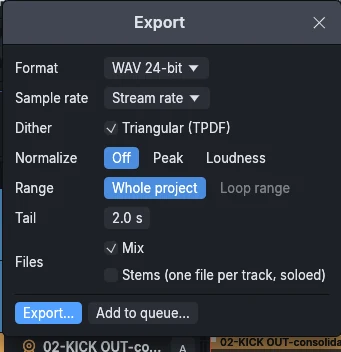
Exporting the mix
File › Export (Ctrl+Shift+E) opens the export window. Ready-made settings fill it in one click: Streaming (WAV 24-bit at -14 LUFS), CD (WAV 16-bit, 44.1 kHz, dithered, peaks at -1 dBFS), Mastering (WAV 32-bit float, untouched) and Stems (one file per track). Then:
| Setting | Choices |
|---|---|
| Format | WAV 16-bit, 24-bit or 32-bit float; FLAC 16 or 24-bit; MP3; Opus |
| Sample rate | the project's, or any other |
| Dither | triangular (TPDF), when going down to 16 bits |
| Normalize | to a peak or to a loudness (LUFS) |
| Range | the whole project or the loop range |
| Tail | seconds added after the end, for reverbs and delays |
| Stems | one file per track, soloed, besides or instead of the mix |
| Master effects | shown when the master has effects: export with them or without them |
The bar at the bottom sums up what will be written (format, rate, length, number of files) before Export…. Exports run faster than real time, in the background. The metronome and the monitoring effects are never exported.
When effects are active on the master, the window names them: the files go through them. Export without them leaves them out of this export only; Mastering ticks it, since a mastering engineer expects a mix without a limiter. An effect meant only for listening (headphone or room correction) belongs in the master's monitoring effects, which are never exported.
Render queue
Add to queue… keeps an export, with the project as it is at that moment, to render later with others. The Render queue lists them; render them all in one go, when you leave the computer.
A single track
The track header's menu exports a track alone, after its effects.
Freeze and bounce
- Freeze renders a track with its effects and plays the result instead, to save processing power. Unfreeze it to change its effects.
- Bounce renders a track onto a new track.
From a terminal
audiostrada render song.strada --output mix.wav mixes a project (or audio files) into a WAV file without opening the window.