
Utility
StradaCorrect
Pitch correction, natural or robotic.
Choose the key and the scale, then the speed: from a correction nobody hears to the hard effect.
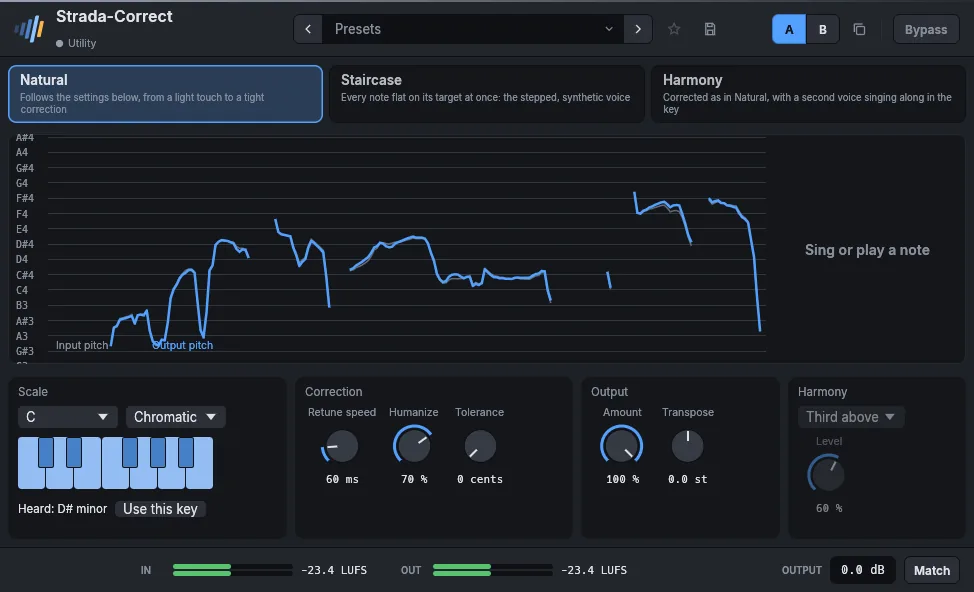
- Key and scaleOr the notes you choose.
- Retune speed0 ms for the hard effect, slower for a natural voice.
- HumanizeLeaves held notes some life.
- LiveWorks as you play, no analysis pass.
In detail
- Formats
- CLAP · VST3 · AU
- Systems
- Windows 10 and 11, macOS 11 and later (Apple silicon and Intel), Linux x86-64
- In the frame
- Presets, A/B, favorites, bypass without click, LUFS meters, output gain, Match.
- Interface
- 75 % to 200 %, English and French
- License
- Perpetual, every format and computer, offline activation
- Price
- 49 €
Manual
Automatic pitch correction for the voice, from a light touch to the stepped, synthetic voice. The display scrolls the pitch sung (grey) and the corrected one (blue) over the notes of the scale; at its right, the note sung and how far off it is, the note aimed at, and a bar showing by how many cents the voice is being moved.
- Natural follows the settings: Retune speed is the time the voice takes to reach its note (0 ms is immediate, 20 to 60 ms sounds like a singer in tune), Humanize corrects the center of a held note and leaves its vibrato, Tolerance leaves alone a note already that close, Amount corrects only a part of the way.
- Staircase puts every note flat on its target at once, whatever those settings: the voice moves in steps, vibrato and slides gone, as on the first automatically corrected records. Choose a scale with few notes for wider steps.
- Harmony corrects the voice as Natural does and adds a second voice singing along in the key: a third, fifth, sixth or octave above, a third, fourth or octave below, counted in the notes of the scale (of the major scale of the key when the scale is chromatic). Level sets the second voice against the first; the pair keeps the loudness of one voice.
Choose the key and the scale (or click notes on the keyboard for a Custom one). While the voice plays, the effect listens for the key of what is sung and shows it under the keyboard (Heard: A minor); Use this key sets the key and the scale to it. Transpose moves the whole voice by semitones, formants kept.
Parameters
| Parameter | Range | Default |
|---|---|---|
| Key | C, C#, D, D#, E, F, F#, G, G#, A, A#, B | C |
| Scale | Chromatic, Major, Minor, Harmonic minor, Dorian, Pentatonic major, Pentatonic minor, Blues, Custom | Chromatic |
| Retune speed | 0 – 400 ms | 25 ms |
| Humanize | 0 – 100 % | 0 % |
| Amount | 0 – 100 % | 100 % |
| Transpose | -12 – 12 st | 0 st |
| Custom notes | 0 – 4095 | 4095 |
| Tolerance | 0 – 50 cents | 0 cents |
| Mode | Natural, Staircase, Harmony | Natural |
| Harmony | Third above, Fifth above, Sixth above, Octave above, Third below, Fourth below, Octave below | Third above |
| Harmony level | 0 – 100 % | 60 % |
Factory presets
Vocal Hard tune · Pop, tight · Natural, keeps the vibrato · Ballad, long notes only · Light touch · Backing, locked
Staircase Every semitone · Major scale · Minor pentatonic · Low and synthetic
Harmony Third above · Fifth above, discreet · Octave below, doubled
FX Octave down · Octave up · A fifth above, tight
Also in these packs
Goes well with
Hear them on your own mixes.
Download the plugins, open your last session, and use them for 15 days. Nothing to sign up for.