
EQ & filter
StradaEQ
The equalizer that shows you where to cut.
Up to 16 bands drawn over the live spectrum, dynamic bands, mid and side placement and a solo to find a resonance in seconds.
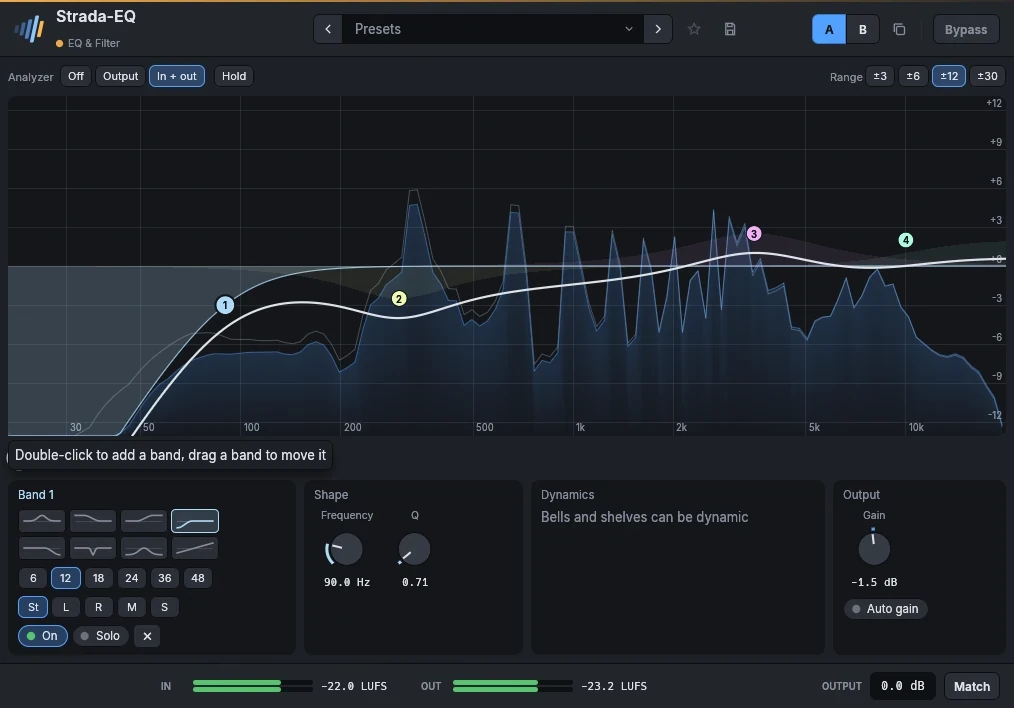
- 16 bands on the curveDouble-click to add a band, drag to move it, the wheel for its width. Bell, shelves, cuts from 6 to 48 dB per octave, notch, band pass and tilt.
- Dynamic bandsA band can cut a resonance only while it rings, or lift the crack of a snare only on its hits.
- Stereo, mid and sideEach band works on both channels, the left, the right, the mid or the sides.
- Analyzer before and afterThe spectrum of the input and the output under the curve, with hold, and a solo that plays only what a band touches.
In detail
- Formats
- CLAP · VST3 · AU
- Systems
- Windows 10 and 11, macOS 11 and later (Apple silicon and Intel), Linux x86-64
- In the frame
- Presets, A/B, favorites, bypass without click, LUFS meters, output gain, Match.
- Interface
- 75 % to 200 %, English and French
- License
- Perpetual, every format and computer, offline activation
- Price
- 49 €
Manual
Up to 16 bands on the curve. Double-click the curve to add a band (a cut near the ends, a bell elsewhere), drag a band to move it, Ctrl-drag it (up narrower, down wider) or use the wheel over it to set its Q, double-click it to remove it.
Right-click a band for its shape, drawn (bell, low and high shelf, low and high cut, notch, band pass, tilt), the slope of a cut (6 to 48 dB per octave), its placement (both channels, left, right, mid or sides), Dynamic, Solo and Bypass, Gain to 0 dB and Flip the gain. Under the curve, the selected band has the same drawn shapes, its slope and placement, then its frequency, gain and Q.
- A dynamic band listens to its own frequencies at the input (a bell around its frequency, a low shelf below it, a high shelf above it) and moves its gain while they are above the Threshold: by as many dB as they pass it, up to the Range, at the speed set by Attack and Release. A negative range cuts when loud (a resonance that only rings now and then, sibilance, a boomy note); a positive range boosts when loud (the crack of a snare on its hits only). To boost while quiet, give the band a gain and a negative range of the same size: it boosts at rest and comes back to flat when its frequencies get loud. The panel says what the band does and the gain it has now; on the curve, its range shows as a line under the band, the gain it has now as a ring.
- Solo plays only the frequencies the band works on, to find what to cut; it stops when the window closes.
Parameters
| Parameter | Range | Default |
|---|---|---|
| Band n in use | on / off | off |
| Band n bypass | on / off | off |
| Band n type | Bell, Low shelf, High shelf, Low cut, High cut, Notch, Band pass, Tilt shelf | Bell |
| Band n frequency | 20 – 20000 Hz | 1000 Hz |
| Band n gain | -30 – 30 dB | 0 dB |
| Band n Q | 0.1 – 30 | 1 |
| Band n slope | 6 dB/oct, 12 dB/oct, 18 dB/oct, 24 dB/oct, 36 dB/oct, 48 dB/oct | 12 dB/oct |
| Band n dynamic | on / off | off |
| Band n threshold | -60 – 0 dB | -24 dB |
| Band n range | -30 – 30 dB | -6 dB |
| Output | -30 – 30 dB | 0 dB |
| Solo band | 0 – 16 | 0 |
| Band n placement | Stereo, Left, Right, Mid, Side | Stereo |
| Band n attack | 0.1 – 200 ms | 5 ms |
| Band n release | 5 – 2000 ms | 120 ms |
| Auto gain | on / off | off |
Factory presets
Vocal Presence · Air 12 kHz · Less mud · Soften harsh notes · Backing, sit behind · Voice-over, podcast
Drums Kick punch · Kick deep sub · Snare crack · Toms, full and clear · Overheads, cymbal air · Bus, weight and air
Bass Definition · Sub weight · Heard on small speakers
Guitar Fit in the mix · Tame the fizz · Acoustic, sparkle · Acoustic, less boom
Keys Piano, clarity · Synth, make room for the vocal · Pad, soft and dark
Master Gentle smile · Tilt brighter · Tilt warmer · Clear the low mids · Mono lows below 120 Hz · Wider air
Fix Low cut 100 Hz · Rumble below 30 Hz · Mains hum 50 Hz · Mains hum 60 Hz · Harsh 3 kHz, only when loud
FX Telephone · Old radio · Next room
Also in these packs
Goes well with
Hear them on your own mixes.
Download the plugins, open your last session, and use them for 15 days. Nothing to sign up for.