 AudioStrada
El manual está escrito en inglés y en francés.
AI assistants
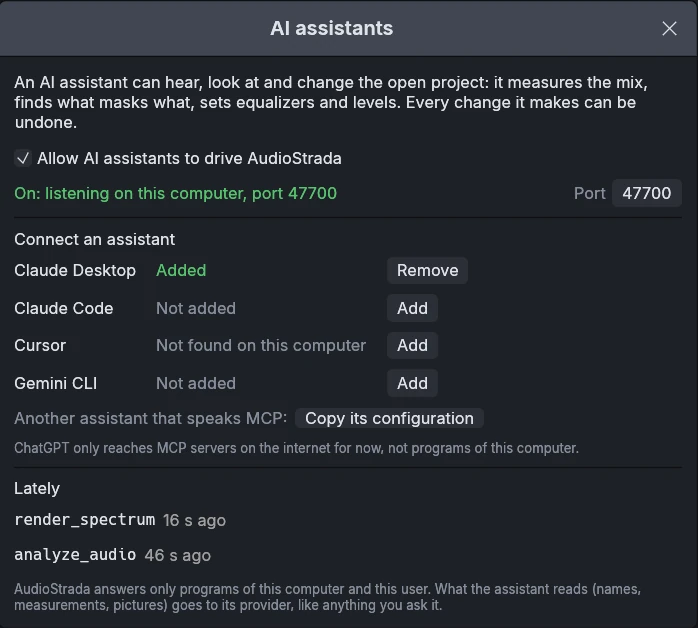
AudioStrada speaks the Model Context Protocol (MCP): an AI assistant such as Claude Desktop, Claude Code, Cursor or Gemini CLI can build and mix a project with you, listen to it and explain what it hears. Every change it makes shows in the window and can be undone.
Setting up
Click the robot button at the top right of the window (or Help › AI assistants…). Switch on Allow AI assistants to drive AudioStrada, then add AudioStrada to Claude Desktop, Claude Code, Cursor or Gemini CLI with one click, and restart the assistant. For another assistant, copy its configuration from the window. The robot button turns green while assistants may drive AudioStrada.
If an assistant was installed while the window was open, Check again looks for it. The bottom of the window says whether assistants may connect, and on which port. The window lists the last tools assistants called. The setting stays on from one session to the next. An assistant started before AudioStrada, or across a restart of AudioStrada, reconnects at its next request.
What an assistant can do
AudioStrada speaks the Model Context Protocol (MCP), so an AI agent (Claude Code, Claude Desktop, any MCP client) or a script can build and mix a project: import audio, add tracks and effects, set levels, cut, strip silence, export and save. The agent first calls inspect_project, which describes the tracks, clips, inserts and sends.
The agent also hears what it does. analyze_audio renders a track (alone, after its effects) or the master and describes it: loudness (LUFS, true peak, loudness range), dynamics over time, stereo image, share of energy per frequency band, resonances, tempo, and notes on problems (clipping, a master too loud for streaming, phase). compare_audio sets two tracks side by side and names the frequency ranges where they compete. The agent can then change an EQ or a level and listen again. express_mix runs the Express Mix on every audio track (or those given) and applies it in one undo step: doses from 0 to 100 (clean, bring_out, balance, depth, ambience, wide), a style (transparent, warm, clean, punchy, big) at an intensity, buses, headroom, and the instruments of tracks whose names do not tell. It writes music too: read_midi_clip gives the notes of a MIDI clip in beats (with the drum map of a Strada-Drums track), write_midi_clip replaces or adds notes, add_midi_clip makes a new clip, and export_midi_file / import_midi_file go through standard MIDI files. Ask it to vary a drum pattern from section to section, write a bass line or a chord progression.
It arranges as you would on the timeline: move_clips (in time or to another track), trim_clip, duplicate_clips, delete_clips (with ripple), set_clip (gain, fades and their shape, mute, name, stretch, pitch) and set_crossfade. Each call is one undo step, and the audio files themselves are never moved, changed or deleted.
It mixes with the whole console: presets and saved chains (list_presets, load_preset, save_preset, list_chains, add_chain), automation (read_automation, write_automation: volume rides, filter sweeps, sends), sends, buses, VCAs, groups and sidechains (set_send, set_routing, set_sidechain), the console colour (set_console), mix snapshots, and third-party plugins (list_plugins, add_insert with a plugin's key, plugin_params).
It knows the song: sections (markers name them), set_marker, set_tempo_map, analyze_sections, detect_key, compare_to_reference (against any recording), and transform_midi (quantize with swing, transpose, velocities, humanize, lengths). In a running AudioStrada it plays with you: transport (play, stop, locate, loop a stretch) and show (selects and zooms on what it talks about).
Assistants that support MCP prompts offer four ready requests: check the mix, master for streaming, vary the drums, write a part.
It can also look: render_spectrum draws the spectrum of up to three tracks over each other, render_spectrogram how the frequencies move over time, and render_waveform the waveform above the short-term loudness. Assistants that read images (Claude among them) see these pictures as you would.
Ideas to ask
- "Check my mix: is anything masking the vocal?"
- "Master this song for streaming at -14 LUFS."
- "Vary the drums between the verse and the chorus."
- "Write a bass line that follows the kick, in the key of the song."
- "Compare my mix with this reference and tell me what differs."
For scripts
audiostrada mcpworks on a project of its own, without a window (it can create or open one). For Claude Code:claude mcp add audiostrada -- audiostrada mcp.audiostrada --control 9000 song.stradaopens AudioStrada as usual and listens on that local port;audiostrada mcp --connect 9000then drives this running AudioStrada, where every change shows and can be undone. It can also run any menu command by name. Only programs of the same user can connect: the channel needs the token AudioStrada writes to~/.config/audiostrada/control-token.