 AudioStrada
El manual está escrito en inglés y en francés.
Preferences
View › Preferences… (Ctrl+,) lists its pages at the left: Appearance and General; Audio, MIDI and Recording; Keyboard shortcuts and Plugins. Each page groups its settings on cards, the name and what it does at the left, the control at the right. Changes apply at once and are kept; Done closes the window.
Find a setting, at the top of the list, keeps only the pages holding what you type, with the settings found under each; a click (or Enter for the first) opens the page. Typed there, a command's name opens the keyboard shortcuts already searched.
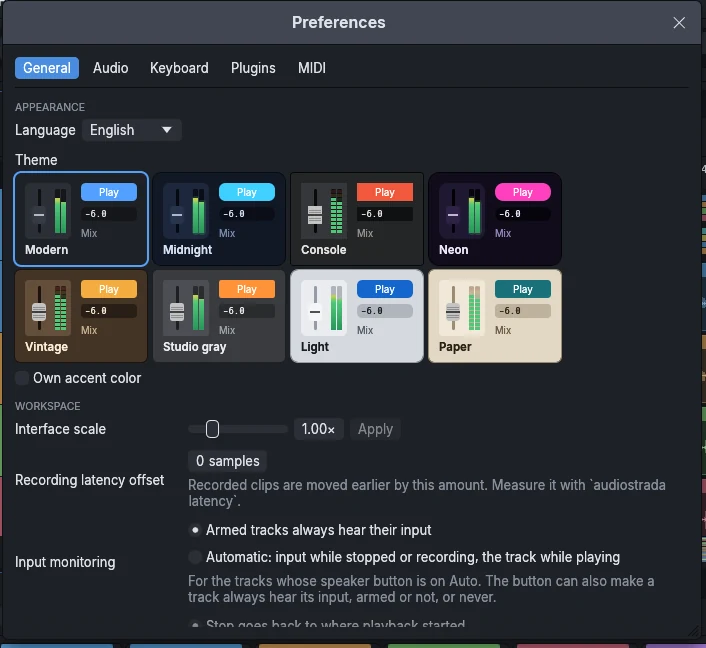
Appearance
- Theme: four themes, shown as small pictures: Dark, Studio gray, Light (white glossy strips and buttons) and Custom. Customize… opens your own theme beside a live preview: Start from one of the three, then choose the background, the accent and the contrast; every other color follows, and colors that would not read are corrected (the background stays clearly dark or clearly light, the accent stands out and keeps away from the record red). The corners, the meters and the fader caps can be changed too.
- Language: English or French; Automatic follows the system's language.
- Interface scale takes effect with Apply (Cancel puts the slider back).
- Master: the master strip at the left or at the right of the tracks in the mixer.
- Mixer: Compact mixer narrows the strips; a click opens one full width.
- Timeline: the master track at the top of the timeline, to draw its automation.
- Transport: at the top or at the bottom, and large to read it from afar.
General
- Play key: Stop goes back to where playback started, or stays where it is.
- Several screens: puts each window back on its screen (X11 mode, see Plugins).
- New versions: Check once a day tells you when a new official build is out. Nothing is installed on its own: the update window installs it when you ask (see Licence and updates).
Audio
The backend (PipeWire, JACK, ALSA; WASAPI or ASIO on Windows; CoreAudio on macOS), the output and input devices, the sample rate, the buffer size and the channels, with the latency they give. Test tone plays 440 Hz at -18 dBFS; the input meters show what comes in. On Linux, System check runs the same checks as audiostrada diagnose and shows how to fix each problem.
MIDI
The MIDI inputs: tick the keyboards and controllers to use. Refresh finds a device plugged in after the start.
Recording
Input monitoring of the armed tracks (always, or automatic), and the recording latency offset.
Keyboard shortcuts
Pick a preset (AudioStrada, Pro Tools, Logic, Reaper) and change any shortcut: click Change, press the new keys (Escape cancels); Add gives a command one more shortcut, Clear removes its keys, Reset gives back those of the preset. The commands are grouped as in the menus, their keys drawn as keys. The search finds a command by name. Reset all shortcuts gives every command back the keys of the preset.
Plugins
The plugins found, the scan buttons, the standard folders and your own (Add folder…), the sandbox (each plugin in its own process), and Disable third-party plugins.