 AudioStrada
El manual está escrito en inglés y en francés.
Effects
AudioStrada comes with thirty-two built-in effects and instruments, the Strada series. Each one has factory presets, user presets and A/B comparison at the top of its window. This chapter goes through them family by family; the parameter tables give each control's range and default.
Presets and chains
- Presets: the bar at the top of an effect's window shows the preset loaded, with a dot when its settings changed since. The arrows beside it, or Left and Right, step through the presets; right-click an arrow › MIDI learn and press a button of your MIDI controller to step them from there, window open or not. Click its name for the preset panel: a search, the categories, your favorites, the factory presets and yours apart. The ear at the right of a preset lets you hear it (a second click stops), as browsing with Up and Down does; Enter keeps it, Escape goes back to the settings before. Right-click one of yours to rename or delete it. The star adds the preset to your favorites, the disk saves the current settings (type Category: name to file it). A / B hold two settings to compare, the button beside them copies one onto the other.
- Factory presets start with Default, the effect's own settings, then go by source or job (Vocal, Drums, Bass, Bus, Master, Fix...), three to six under each. They are set on recordings of what they name, to work at once on a track whose peaks sit around -6 dBFS: those that shape a sound give it back at the loudness it came in, and a compressor's threshold is the first thing to move for a quieter or louder track. Those under Send are fully wet, for an effect on a bus fed by sends; Sidechain and Ducker presets expect a key from another track.
- Bypass, at the right of the bar, is lit amber while the effect is bypassed.
- Effect chains keep a whole list of effects with their settings: right-click an effect (or use the track menu) › Save effects as a chain (its window lists the effects saved and warns when the name replaces a chain of yours), then add it to any track from + insert › Chains.
Effect windows are windows of their own, which can go to another screen; clicking an insert again brings its window to the front.
Mastering and vocal chains
Strada-Master
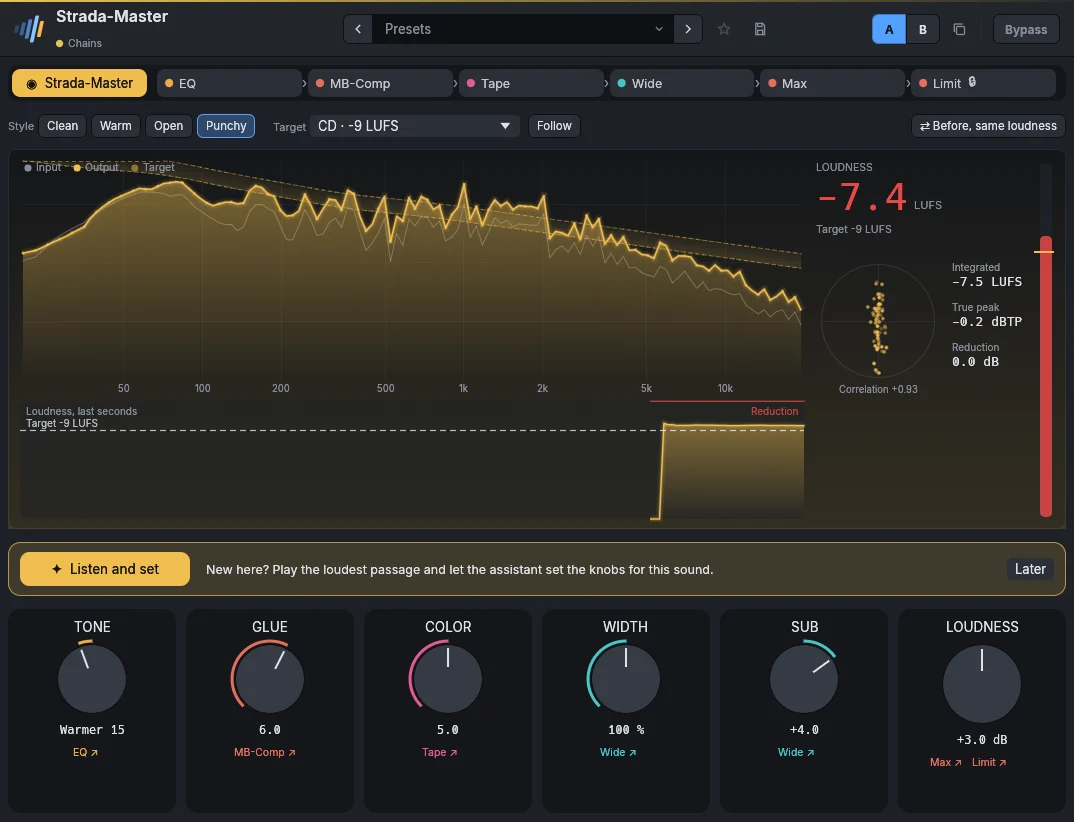
A mastering chain behind six big knobs: Tone (darker or brighter: two shelves and an air shelf in Strada-EQ's last bands), Glue (Strada-MB-Comp's thresholds), Color (Strada-Tape), Width (Strada-Wide, the bass kept in the center), Sub (more or less of the lowest octave: a low shelf at 70 Hz, the last band of Strada-EQ, Strada-Wide keeping it in the center) and Loudness (Strada-Max's drive, Strada-Limit keeping the true peaks under the ceiling). Above them, a style (Clean, Warm, Open, Punchy) sets the stages a starting point, and a target sets the limiter's ceiling and the loudness aimed at (choosing one moves the Loudness knob by the gap between the targets, then trims it by ear over a few seconds of music): Streaming -14, Apple Music, podcast -16, CD -9 (peaks up to -0.3 dB), Club -7, Vinyl -12 (lows in mono, room under the peaks), TV, radio -23 LUFS (EBU R128), and Pre-master, for a mastering engineer: nothing maximized, peaks held at -6 dBFS. Follow reaches the target, then keeps it whenever a setting changes (a knob, the style, a stage's settings): each change is measured over a few seconds, the output against the input, and made up for. The music getting louder or softer never moves it, so quiet and loud sections keep their difference. Before, same loudness plays the mix without Strada-Master, raised to its loudness, to hear what the processing does without the loudness speaking for it; it stops when the window closes.
The display draws the song's spectrum in the style's tunnel, its loudness over the last seconds against the target, the stereo image, the true peak and the maximizer's gain reduction.
The bar at the top is the chain: its first tab, Strada-Master, shows the knobs; the others open each stage's own editor, its presets included. Drag a stage to change the order the sound goes through them; Strada-Limit stays last. Each knob acts around the settings of the stage under it, without changing them; a stage's editor shows its settings as they are played, the knobs applied, and what you change there becomes the base the knobs act around. Listen and set, offered when the effect is first opened, lets the assistant hear eight seconds of the loudest passage: it sets Tone, Glue, Width, Sub and Loudness for the mix and the target, then trims the loudness once the output has settled. The slider between Your settings and Assistant blends its proposal with what you had; Undo puts your settings back.
Parameters
| Parameter | Range | Default |
|---|---|---|
| Tone | -100 – 100 % | 0 % |
| Mix glue | 0 – 100 % | 50 % |
| Color | 0 – 100 % | 50 % |
| Width | 0 – 200 % | 100 % |
| Sub | -100 – 100 % | 0 % |
| Loudness | -12 – 18 dB | 4 dB |
| Style | Clean, Warm, Open, Punchy | Clean |
| Target | Streaming, Apple Music, podcast, CD, Club, Vinyl, TV, radio, Pre-master | Streaming |
| Follow the target | on / off | off |
Factory presets
Pop Polished for streaming · Bright and loud · Warm ballad
Rock Punchy · Dense and loud · Live and open
Hip-hop Heavy low end · Crisp and loud · Lo-fi and warm
Electronic Club loud · Wide and bright · Deep and warm
Acoustic Natural · Folk warmth · Jazz, keeps the dynamics
Orchestral Transparent · Film, wide · Gentle warmth
Podcast Clear voice · Broadcast · Warm audiobook
Lo-fi Dusty tape · Cassette demo · Warbly and soft
Strada-Vocals
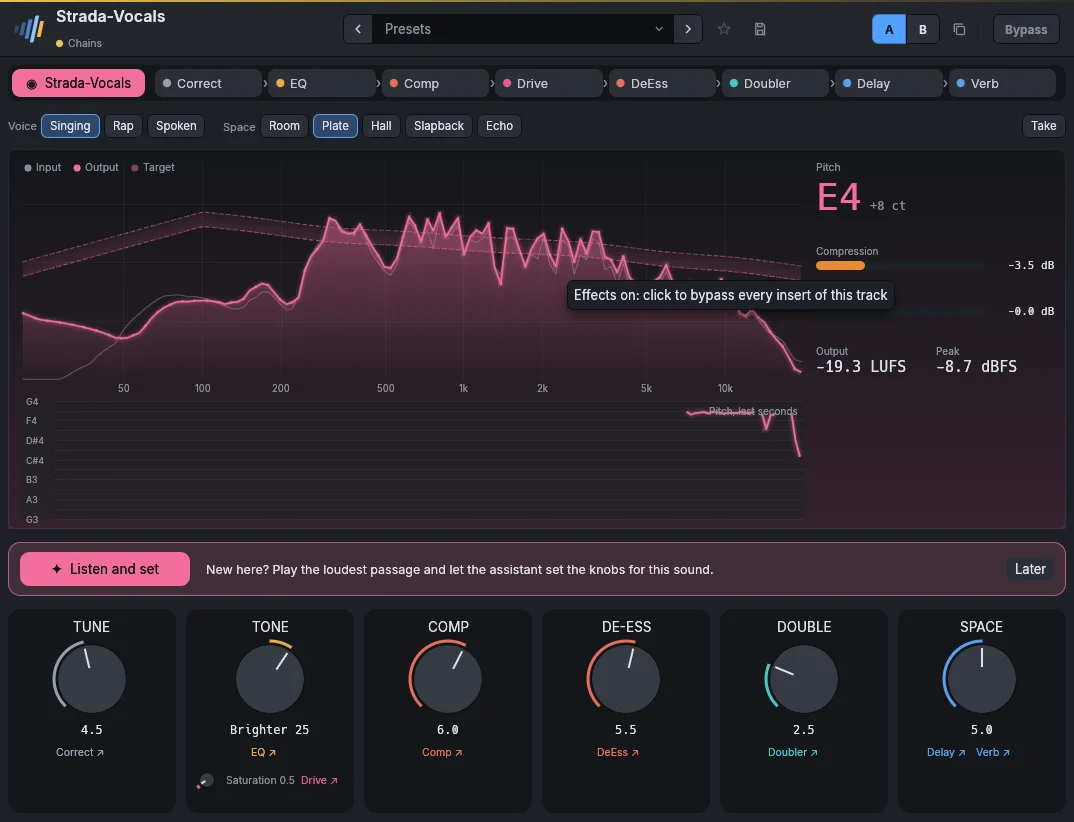
A vocal chain behind six big knobs: Tune (Strada-Correct: more is faster and firmer), Tone (warmer or brighter, with air on top) with its small Saturation knob (Strada-Drive, from a touch of warmth to grit), Comp (Strada-Comp's threshold), De-ess (Strada-DeEss), Double (Strada-Doubler) and Space (Strada-Delay and Strada-Verb, ducked under the voice). The voice (Singing, Rap, Spoken) and the space (Room, Plate, Hall, Slapback, Echo) set the stages a starting point. The display draws the voice's spectrum against its target, the pitch sung over the last seconds, the note, the compression and the de-essing. Take, while recording, leaves out the tuning and the space, and with them their latency.
As in Strada-Master, the chain's bar opens and reorders the stages, and Listen and set sets Tone, Comp and De-ess for the voice heard, the compressor's and de-esser's thresholds at its level, and Strada-Correct's key from the notes sung.
Parameters
| Parameter | Range | Default |
|---|---|---|
| Pitch correction | 0 – 100 % | 0 % |
| Tone | -100 – 100 % | 0 % |
| Saturation | 0 – 100 % | 0 % |
| Comp | 0 – 100 % | 50 % |
| De-ess | 0 – 100 % | 50 % |
| Double | 0 – 100 % | 0 % |
| Space | 0 – 100 % | 50 % |
| Voice | Singing, Rap, Spoken | Singing |
| Space type | Room, Plate, Hall, Slapback, Echo | Plate |
| Take | on / off | off |
Factory presets
Pop Modern lead · Airy ballad · Tuned and tight · Backing stack
R&B Smooth lead · Silky doubles · Late night
Rap Upfront · Hard-tuned melodic · Ad-libs, wide
Rock Gritty lead · Big chorus · Raw and close
Singer-songwriter Natural · Intimate · Warm room
Podcast Clear voice · Radio voice · Audiobook
FX Telephone · Old radio · Robot · Huge echo
Dynamics
Strada-Comp
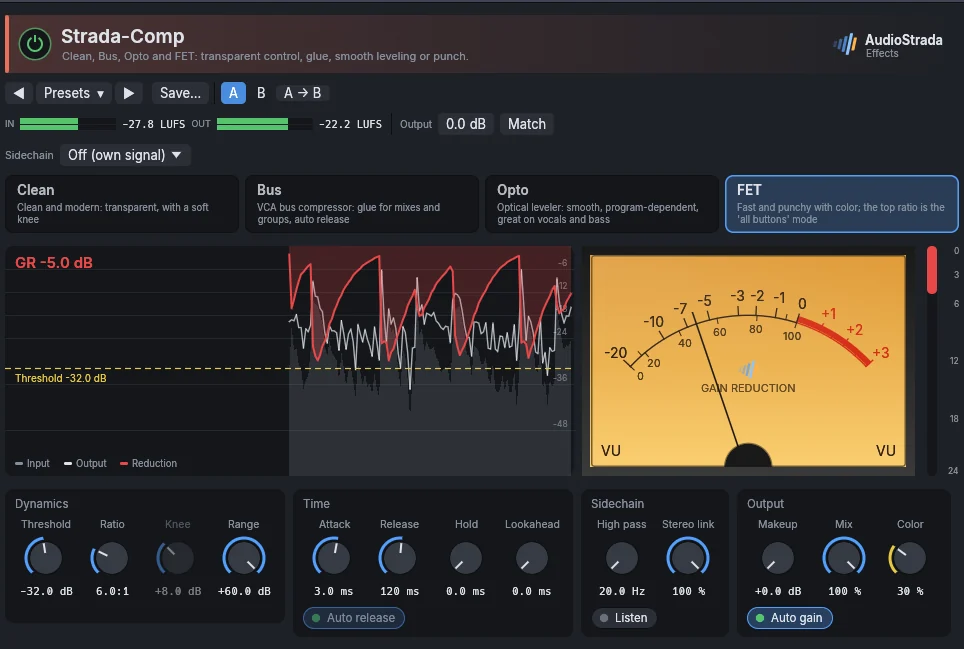
A compressor with four characters: Clean for transparent control, Bus for glue, Opto for smooth levelling and FET for punch. Threshold, ratio, attack and release as usual; Auto release follows the material, Color adds the character's saturation, Mix blends the dry signal back (parallel compression), the sidechain filter keeps the lows from pumping.
Parameters
| Parameter | Range | Default |
|---|---|---|
| Character | Clean, Bus, Opto, FET | Clean |
| Threshold | -60 – 0 dB | -18 dB |
| Ratio | 1 – 20 :1 | 4 :1 |
| Attack | 0.05 – 100 ms | 10 ms |
| Release | 10 – 1200 ms | 150 ms |
| Auto release | on / off | on |
| Knee | 0 – 24 dB | 6 dB |
| Makeup | 0 – 24 dB | 0 dB |
| Color | 0 – 100 % | 30 % |
| Sidechain HPF | 20 – 500 Hz | 20 Hz |
| Mix | 0 – 100 % | 100 % |
| Lookahead | 0 – 20 ms | 0 ms |
| Hold | 0 – 500 ms | 0 ms |
| Range | 0 – 60 dB | 60 dB |
| Auto gain | on / off | off |
| Stereo link | 0 – 100 % | 100 % |
| Sidechain listen | on / off | off |
Factory presets
Vocal Gentle · Smooth opto · Radio-ready · Rap, upfront · Backing, tucked in · Voice-over, steady
Drums Kick punch · Snare crack · Toms, full · Overheads, tamed · Room, all buttons · Parallel crush
Bass Control · Opto leveler · Slap tamer
Guitar Sustain · Funk snap · Acoustic, even strumming · Acoustic, fingerpicking
Keys Piano, gentle · Piano, pop upfront · Electric piano, even
Bus Drum glue · Drum smash · Mix glue · Mix, light touch · Vocals together
Sidechain Duck under the kick · Bass under the kick · Pumping · Slow breathing
Strada-Gate
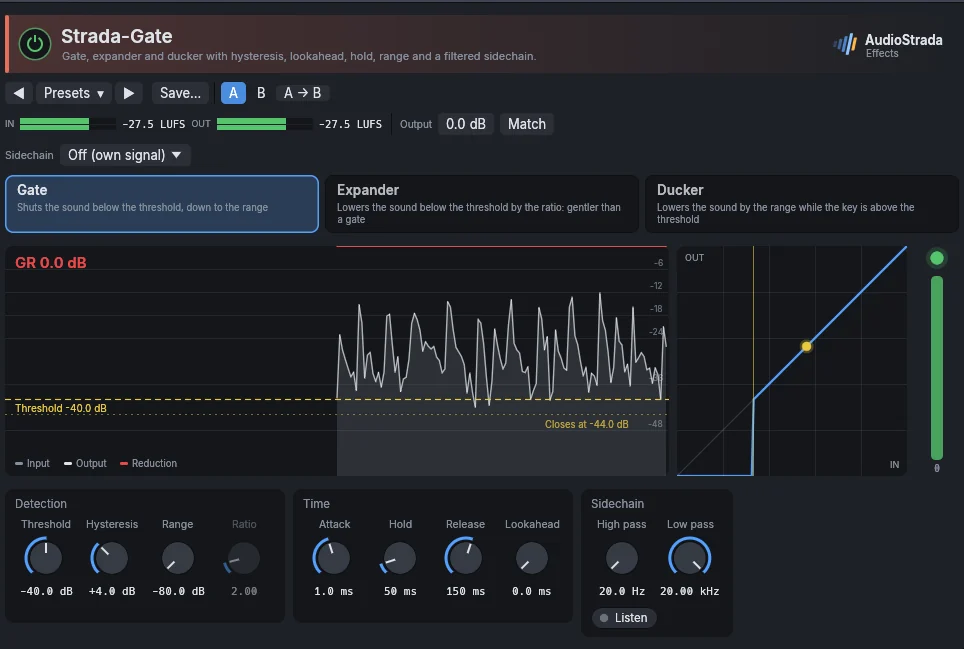
Gate, expander and ducker, with hysteresis (it opens and closes at different levels, so it does not chatter), lookahead, hold and range. The sidechain filters and Listen help it hear only the drum you want.
Parameters
| Parameter | Range | Default |
|---|---|---|
| Threshold | -80 – 0 dB | -40 dB |
| Range | -80 – 0 dB | -80 dB |
| Attack | 0.05 – 50 ms | 1 ms |
| Hold | 0 – 500 ms | 50 ms |
| Release | 5 – 2000 ms | 150 ms |
| Hysteresis | 0 – 12 dB | 4 dB |
| Lookahead | 0 – 10 ms | 0 ms |
| Sidechain HPF | 20 – 2000 Hz | 20 Hz |
| Sidechain LPF | 1000 – 20000 Hz | 20000 Hz |
| Sidechain listen | on / off | off |
| Mode | Gate, Expander, Ducker | Gate |
| Ratio | 1 – 10 | 2 |
Factory presets
Drums Kick, tight · Snare, bleed control · Toms, hits only · Bus, tight · 80s gated reverb
Vocal Breath reducer · Silence between phrases · Voice-over, room noise
Guitar High-gain silence · Tight palm mutes · Amp hum between riffs
Ducker Music under the voice · Bass under the kick · Reverb under the vocal
Fix Noise floor · Headphone bleed · Hiss between notes
Strada-Transient
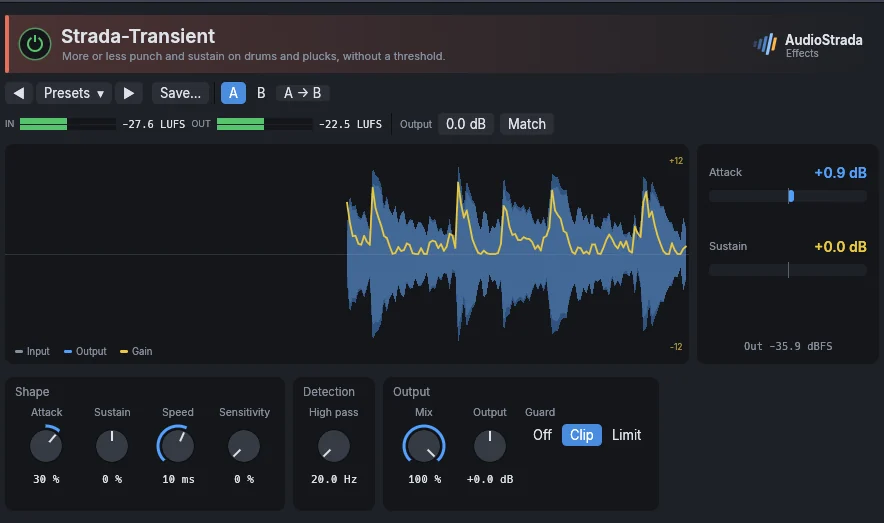
More or less punch and sustain on drums and plucks, without a threshold: Attack raises or softens the hits, Sustain the ring after them.
Parameters
| Parameter | Range | Default |
|---|---|---|
| Attack | -100 – 100 % | 30 % |
| Sustain | -100 – 100 % | 0 % |
| Speed | 1 – 50 ms | 10 ms |
| Guard | Off, Clip, Limit | Clip |
| Output | -12 – 12 dB | 0 dB |
| Mix | 0 – 100 % | 100 % |
| Sensitivity | 0 – 100 % | 0 % |
| Sidechain HPF | 20 – 1000 Hz | 20 Hz |
Factory presets
Drums Kick punch · Snare crack · Snare, fat sustain · Toms, shorter ring · Bus, tight and punchy · Bus, more room
Guitar Acoustic, pick attack · Funk bite · Softer strumming
Bass Pluck definition · Longer notes · Slap, tamed
Keys Piano, more hammer · Piano, softer touch · Plucks pop out
Fix Soften attacks · Less room · Clicky kick, tamed
Strada-DeEss
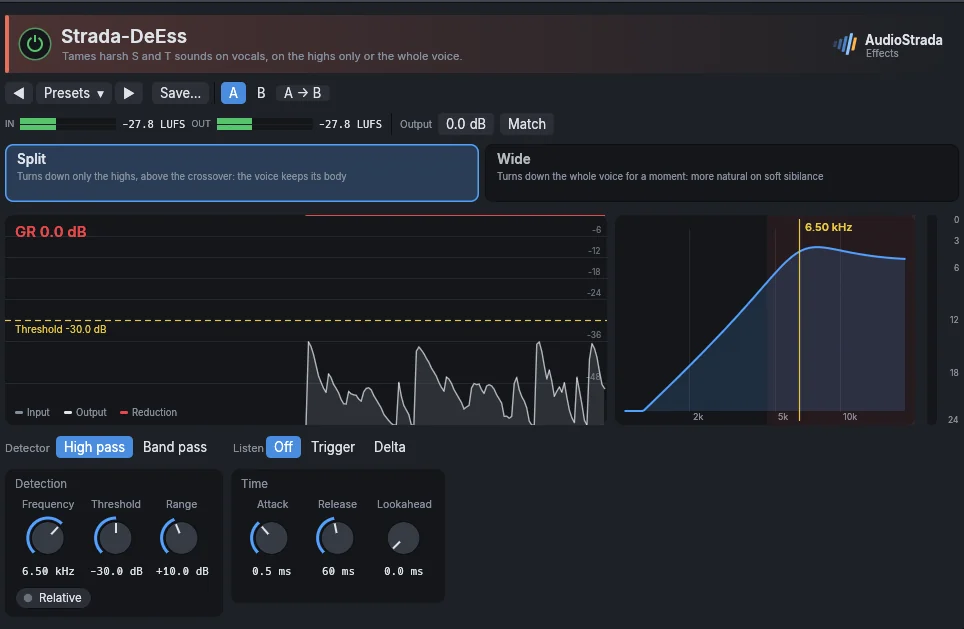
Tames harsh S and T sounds on vocals. Set the frequency with Listen on, then the threshold; the mode works on the highs only or on the whole voice.
Parameters
| Parameter | Range | Default |
|---|---|---|
| Frequency | 2000 – 12000 Hz | 6500 Hz |
| Threshold | -60 – 0 dB | -30 dB |
| Range | 0 – 24 dB | 10 dB |
| Mode | Split, Wide | Split |
| Listen | Off, Trigger, Delta | Off |
| Detector | High pass, Band pass | High pass |
| Relative | on / off | off |
| Attack | 0.1 – 10 ms | 0.5 ms |
| Release | 10 – 500 ms | 60 ms |
| Lookahead | 0 – 15 ms | 0 ms |
Factory presets
Vocal Female, standard · Female, bright and harsh · Male, standard · Male, gentle · Wide-band, natural · Backing, strong
Voice-over Broadcast · Podcast, close mic · Audiobook, gentle
Instrument Cymbals, harsh · Hi-hat bleed · Acoustic guitar, string squeaks
Strada-MB-Comp
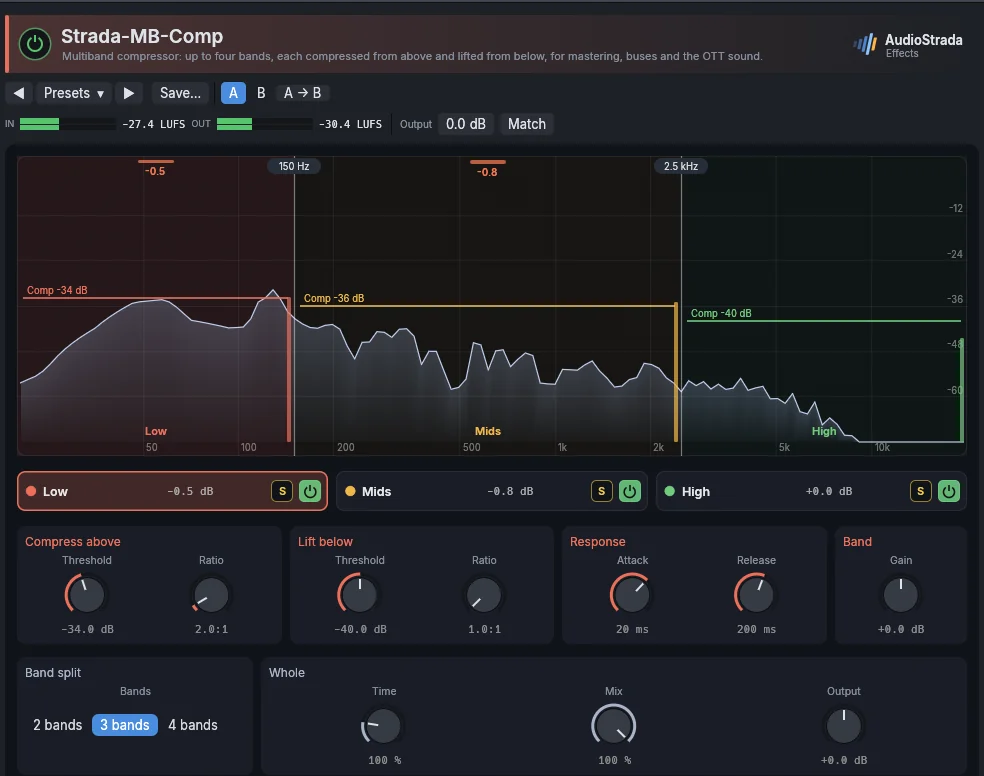
A multiband compressor: up to four bands, split at the crossovers, each compressed from above and lifted from below (lift). Solo plays one band alone.
Parameters
| Parameter | Range | Default |
|---|---|---|
| Bands | 2 bands, 3 bands, 4 bands | 3 bands |
| Crossover 1 | 20 – 16000 Hz | 150 Hz |
| Crossover 2 | 20 – 16000 Hz | 2500 Hz |
| Crossover 3 | 20 – 16000 Hz | 8000 Hz |
| Mix | 0 – 100 % | 100 % |
| Output | -24 – 24 dB | 0 dB |
| Time | 25 – 400 % | 100 % |
| Solo | 0 – 4 | 0 |
| Band n threshold | -60 – 0 dB | -18 dB |
| Band n ratio | 1 – 20 :1 | 2 :1 |
| Band n lift threshold | -80 – 0 dB | -40 dB |
| Band n lift ratio | 1 – 10 :1 | 1 :1 |
| Band n attack | 0.1 – 300 ms | 20 ms |
| Band n release | 5 – 3000 ms | 200 ms |
| Band n gain | -24 – 24 dB | 0 dB |
| Band n bypass | on / off | off |
Factory presets
Master Gentle glue · Tame harshness · Tight low end · Bring out details · Broadcast, loud and even
Bus Mix glue · Mix, clear the mud · Drum punch · Drum smash
Track Vocal, control · Vocal, de-ess and smooth · Bass, even · Guitars, smooth
OTT Light · Full · Synth, bright and dense · Drums, explosive
Strada-Limit and Strada-Max
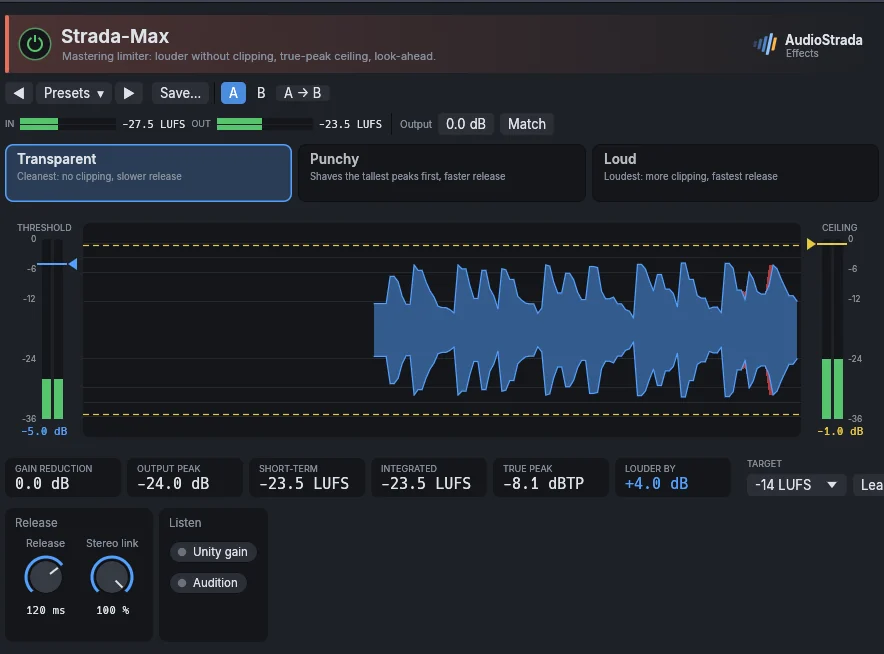
Both look like a mastering maximizer: the input meter on the left with the threshold (drag it down to push the input harder), the output meter on the right with the ceiling, and between them the music scrolling by, red where the limiter takes peaks away. Below: gain reduction, output peak, short-term loudness, and how much louder the output is.
Learn listens while you play the loudest part and moves the threshold until the output reaches the chosen loudness (-14 LUFS for streaming, for instance). Strada-Max is the mastering limiter, with a true-peak ceiling and look-ahead; Strada-Limit is a brickwall peak limiter for tracks and buses. Before, same loudness plays the input without the limiter, raised to its output's loudness, to judge the limiting itself; it stops when the window closes.
Parameters
| Parameter | Range | Default |
|---|---|---|
| Gain | 0 – 24 dB | 4 dB |
| Ceiling | -12 – 0 dB | -1 dB |
| Release | 1 – 1000 ms | 120 ms |
| Style | Transparent, Punchy, Loud | Transparent |
| Stereo link | 0 – 100 % | 100 % |
| Unity gain | on / off | off |
| Audition | on / off | off |
| Before, same loudness | on / off | off |
Factory presets
Master Acoustic, gentle · Transparent -1 dBTP · Streaming -1 dBTP · Broadcast -2 dBTP · CD -0.3 dBTP
Loud Punchy pop · Dense rock · EDM maximum
Bus Drums, peak control · Instruments, firm · Vocals, upfront
Parameters
| Parameter | Range | Default |
|---|---|---|
| Input gain | 0 – 24 dB | 0 dB |
| Ceiling | -12 – 0 dB | -0.3 dB |
| Release | 1 – 1000 ms | 60 ms |
| Lookahead | 0.1 – 5 ms | 2 ms |
| Auto release | on / off | off |
| Stereo link | 0 – 100 % | 100 % |
| True peak | on / off | off |
| Unity gain | on / off | off |
| Audition | on / off | off |
| Before, same loudness | on / off | off |
Factory presets
Master Safety -1 dBTP · Streaming -1 dBTP · Broadcast -2 dBTP · Loud -0.3 dB · Wide, unlinked
Track Vocal, peak catcher · Bass, even level · Acoustic guitar, strum peaks
Drums Bus, peak shave · Kick, clipper-style · Snare, shaved crack
Strada-Trigger
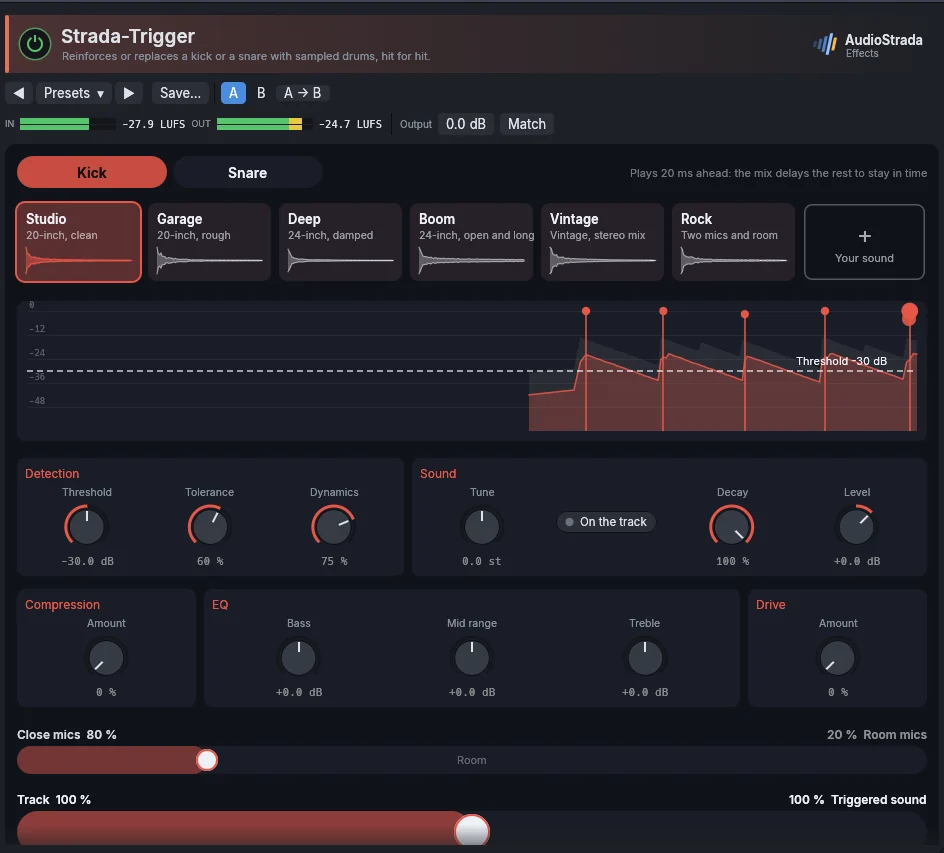
Reinforces or replaces a kick or a snare with sampled drums, hit for hit. The track's hits are drawn live under a threshold to drag. Choose the drum and its sound (studio, garage, deep, boom, vintage, rock… or your own sample), then two faders: close microphones to room, and the track to the trigger.
Parameters
| Parameter | Range | Default |
|---|---|---|
| Drum | Kick, Snare | Kick |
| Kick sound | Studio, Garage, Deep, Boom, Vintage, Rock, Your sound | Studio |
| Snare sound | Crisp, Studio, Rimshot, Vintage, Ringing, Rock, Session, Your sound | Studio |
| Amount | 0 – 100 % | 50 % |
| Threshold | -60 – 0 dB | -30 dB |
| Tolerance | 0 – 100 % | 60 % |
| Dynamics | 0 – 100 % | 75 % |
| Room | 0 – 100 % | 20 % |
| Tune | -12 – 12 st | 0 st |
| Decay | 10 – 100 % | 100 % |
| Level | -24 – 12 dB | 0 dB |
| Compression | 0 – 100 % | 0 % |
| Bass | -12 – 12 dB | 0 dB |
| Mid | -12 – 12 dB | 0 dB |
| Treble | -12 – 12 dB | 0 dB |
| Drive | 0 – 100 % | 0 % |
| Match the track | on / off | off |
Strada-Channel
A console channel in one insert: filters, gate, compressor, four-band EQ and drive, in an order you choose (see Mixing). Auto beside the output keeps the output as loud as the input, whatever the modules add or take, to compare by ear without the level fooling you; the Output knob trims it.
Parameters
| Parameter | Range | Default |
|---|---|---|
| Filters | on / off | off |
| High pass | 20 – 1000 Hz | 80 Hz |
| Low pass | 1000 – 20000 Hz | 20000 Hz |
| Slope | 12 dB/oct, 24 dB/oct | 12 dB/oct |
| Gate | on / off | off |
| Gate threshold | -80 – 0 dB | -50 dB |
| Gate range | -80 – 0 dB | -40 dB |
| Gate attack | 0.05 – 50 ms | 1 ms |
| Gate release | 5 – 2000 ms | 120 ms |
| Compressor | on / off | off |
| Character | Clean, Bus, Opto, FET | Clean |
| Threshold | -60 – 0 dB | -18 dB |
| Ratio | 1 – 20 :1 | 3 :1 |
| Attack | 0.05 – 100 ms | 10 ms |
| Release | 10 – 1200 ms | 150 ms |
| Makeup | 0 – 24 dB | 0 dB |
| Mix | 0 – 100 % | 100 % |
| EQ | on / off | off |
| Low | 30 – 400 Hz | 100 Hz |
| Low gain | -15 – 15 dB | 0 dB |
| Low mid | 150 – 2000 Hz | 400 Hz |
| Low mid gain | -15 – 15 dB | 0 dB |
| Low mid Q | 0.3 – 4 | 0.9 |
| High mid | 600 – 8000 Hz | 2500 Hz |
| High mid gain | -15 – 15 dB | 0 dB |
| High mid Q | 0.3 – 4 | 0.9 |
| High | 2000 – 16000 Hz | 8000 Hz |
| High gain | -15 – 15 dB | 0 dB |
| Module order | 0 – 119 | 0 |
| Drive | on / off | off |
| Drive amount | 0 – 100 % | 30 % |
| Output | -18 – 18 dB | 0 dB |
| Character | Soft, British Warm, British Bright, American Punch, Nashville | Soft |
| Low bell | on / off | off |
| High bell | on / off | off |
| Auto gain | on / off | off |
Factory presets
Vocal Pop lead · Warm ballad · Rap, upfront · Backing, tucked in · Voice-over, podcast
Drums Kick punch · Snare crack · Toms, full and clear · Overheads, open · Bus, glue and weight · Parallel crush
Bass DI, round and present · Pick, rock grit · Sub, clean and deep
Guitar Electric, in the mix · Clean, sparkle · Acoustic, strummed · Acoustic, fingerpicked
Keys Piano, clear · Electric piano, warm · Synth, make room
EQ and filter
Strada-EQ
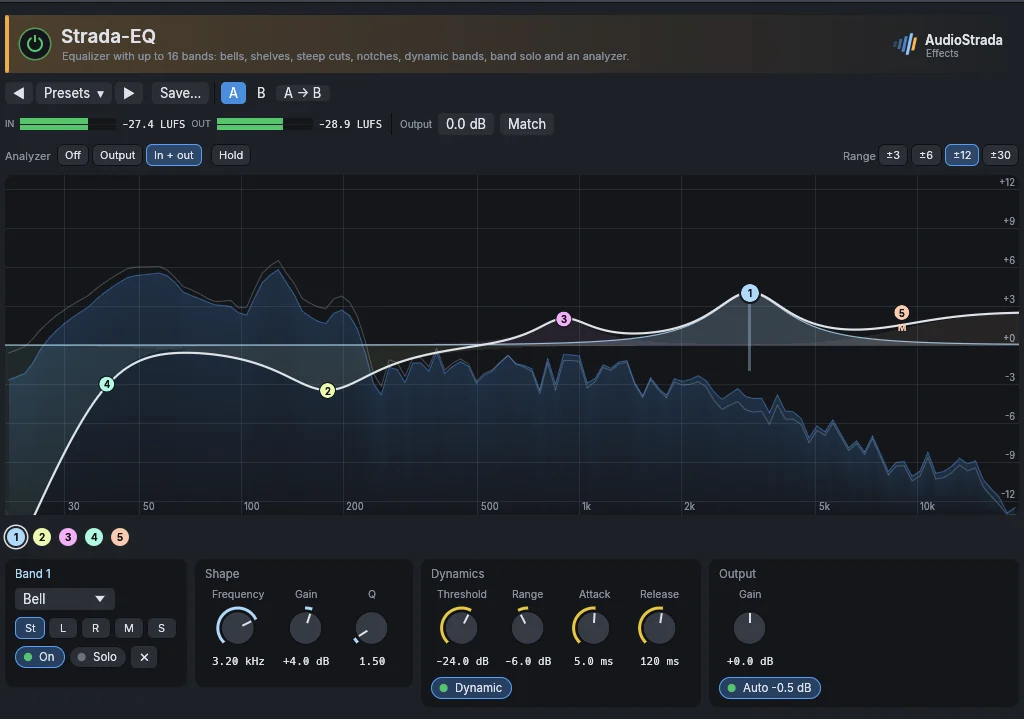
Up to 16 bands on the curve. Double-click the curve to add a band (a cut near the ends, a bell elsewhere), drag a band to move it, Ctrl-drag it (up narrower, down wider) or use the wheel over it to set its Q, double-click it to remove it.
Right-click a band for its shape, drawn (bell, low and high shelf, low and high cut, notch, band pass, tilt), the slope of a cut (6 to 48 dB per octave), its placement (both channels, left, right, mid or sides), Dynamic, Solo and Bypass, Gain to 0 dB and Flip the gain. Under the curve, the selected band has the same drawn shapes, its slope and placement, then its frequency, gain and Q.
- A dynamic band listens to its own frequencies at the input (a bell around its frequency, a low shelf below it, a high shelf above it) and moves its gain while they are above the Threshold: by as many dB as they pass it, up to the Range, at the speed set by Attack and Release. A negative range cuts when loud (a resonance that only rings now and then, sibilance, a boomy note); a positive range boosts when loud (the crack of a snare on its hits only). To boost while quiet, give the band a gain and a negative range of the same size: it boosts at rest and comes back to flat when its frequencies get loud. The panel says what the band does and the gain it has now; on the curve, its range shows as a line under the band, the gain it has now as a ring.
- Solo plays only the frequencies the band works on, to find what to cut; it stops when the window closes.
Parameters
| Parameter | Range | Default |
|---|---|---|
| Band n in use | on / off | off |
| Band n bypass | on / off | off |
| Band n type | Bell, Low shelf, High shelf, Low cut, High cut, Notch, Band pass, Tilt shelf | Bell |
| Band n frequency | 20 – 20000 Hz | 1000 Hz |
| Band n gain | -30 – 30 dB | 0 dB |
| Band n Q | 0.1 – 30 | 1 |
| Band n slope | 6 dB/oct, 12 dB/oct, 18 dB/oct, 24 dB/oct, 36 dB/oct, 48 dB/oct | 12 dB/oct |
| Band n dynamic | on / off | off |
| Band n threshold | -60 – 0 dB | -24 dB |
| Band n range | -30 – 30 dB | -6 dB |
| Output | -30 – 30 dB | 0 dB |
| Solo band | 0 – 16 | 0 |
| Band n placement | Stereo, Left, Right, Mid, Side | Stereo |
| Band n attack | 0.1 – 200 ms | 5 ms |
| Band n release | 5 – 2000 ms | 120 ms |
| Auto gain | on / off | off |
Factory presets
Vocal Presence · Air 12 kHz · Less mud · Soften harsh notes · Backing, sit behind · Voice-over, podcast
Drums Kick punch · Kick deep sub · Snare crack · Toms, full and clear · Overheads, cymbal air · Bus, weight and air
Bass Definition · Sub weight · Heard on small speakers
Guitar Fit in the mix · Tame the fizz · Acoustic, sparkle · Acoustic, less boom
Keys Piano, clarity · Synth, make room for the vocal · Pad, soft and dark
Master Gentle smile · Tilt brighter · Tilt warmer · Clear the low mids · Mono lows below 120 Hz · Wider air
Fix Low cut 100 Hz · Rumble below 30 Hz · Mains hum 50 Hz · Mains hum 60 Hz · Harsh 3 kHz, only when loud
FX Telephone · Old radio · Next room
Strada-Tube EQ
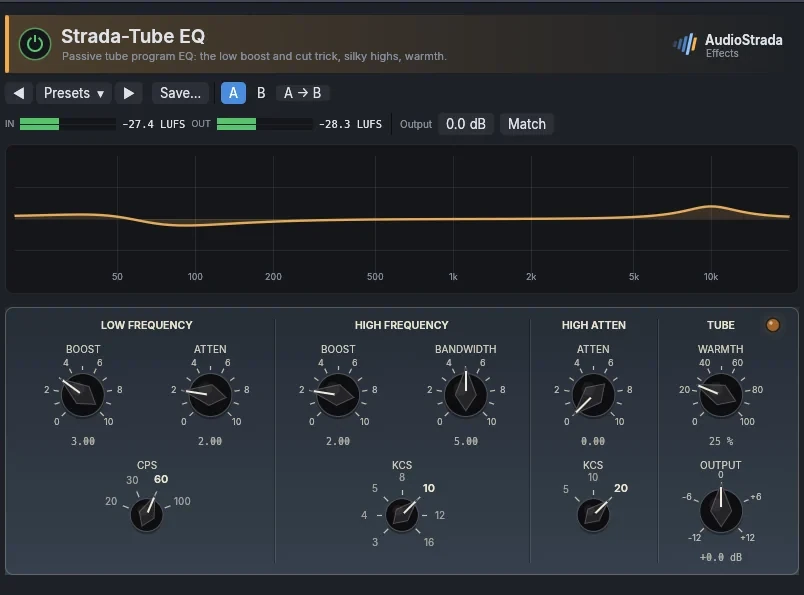
A passive tube program EQ: the famous low boost and cut at the same frequency (the lows grow while the low mids clear), silky highs and tube warmth.
Parameters
| Parameter | Range | Default |
|---|---|---|
| Low frequency | 20 Hz, 30 Hz, 60 Hz, 100 Hz | 60 Hz |
| Low boost | 0 – 10 | 3 |
| Low atten | 0 – 10 | 2 |
| High frequency | 3 kHz, 4 kHz, 5 kHz, 8 kHz, 10 kHz, 12 kHz, 16 kHz | 10 kHz |
| High boost | 0 – 10 | 2 |
| Bandwidth | 0 – 10 | 5 |
| Atten select | 5 kHz, 10 kHz, 20 kHz | 20 kHz |
| High atten | 0 – 10 | 0 |
| Tube warmth | 0 – 100 % | 25 % |
| Output | -12 – 12 dB | 0 dB |
Factory presets
Drums Kick, low end trick · Snare snap · Bus, weight and silk
Bass Low end trick 60 Hz · Round and warm · Tight low end
Vocal Presence 5 kHz · Air · Body and air · Smooth top
Guitar Acoustic, sparkle · Electric, bite 3 kHz · Electric, dark and fat
Master Sheen · Warm and dark · Tube glue · Low end trick and air
Strada-Filter
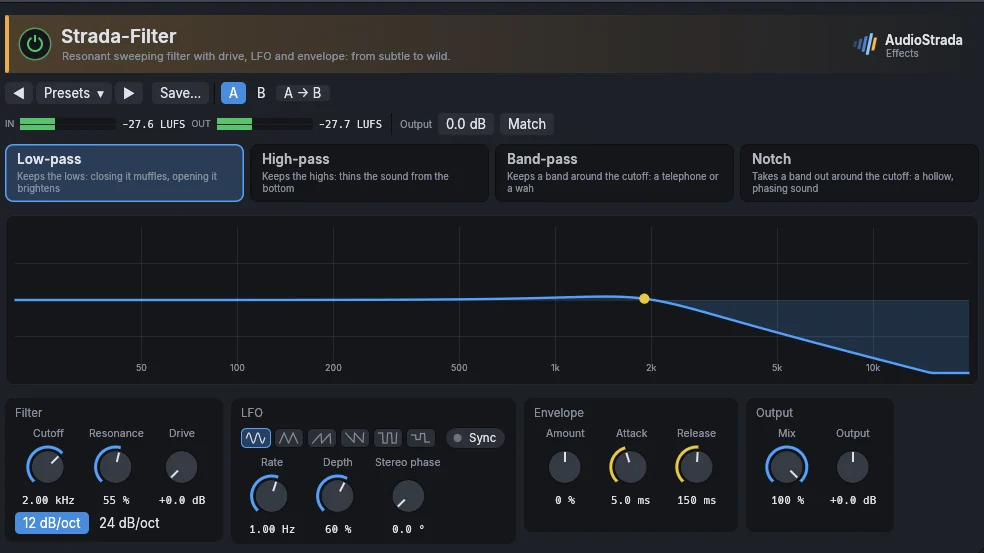
A resonant sweeping filter with drive, an LFO (synced to the tempo or free) and an envelope follower: from a subtle movement to a wild sweep.
Parameters
| Parameter | Range | Default |
|---|---|---|
| Type | Low-pass, High-pass, Band-pass, Notch | Low-pass |
| Cutoff | 20 – 20000 Hz | 2000 Hz |
| Resonance | 0 – 100 % | 30 % |
| Drive | 0 – 24 dB | 0 dB |
| LFO rate | 0.02 – 20 Hz | 1 Hz |
| LFO depth | 0 – 100 % | 0 % |
| Sync to tempo | on / off | off |
| LFO note | 1/16, 1/8, 1/4, 1/2, 1 bar, 2 bars | 1/4 |
| Envelope | -100 – 100 % | 0 % |
| Mix | 0 – 100 % | 100 % |
| Output | -12 – 12 dB | 0 dB |
| Slope | 12 dB/oct, 24 dB/oct | 12 dB/oct |
| LFO shape | Sine, Triangle, Saw up, Saw down, Square, Random | Sine |
| LFO stereo phase | 0 – 180 ° | 0 ° |
| Envelope attack | 0.5 – 100 ms | 5 ms |
| Envelope release | 10 – 2000 ms | 150 ms |
Factory presets
Sweep Slow low-pass, 2 bars · High-pass, 1 bar · Stereo band-pass drift · Random steps 1/16
Transition High-pass build-up · Low-pass breakdown · Narrow band, far away
Rhythm 1/16 filter gate · Wobble 1/8 · Pump 1/4 · High-pass chop 1/8
Envelope Guitar auto-wah · Bass funk · Keys quack · Drums, ducking highs
Tone Radio voice · Next room · Warm low-pass · Thin and distant
DJ Low-pass with drive · High-pass with drive · Mids only
Space
Strada-Verb
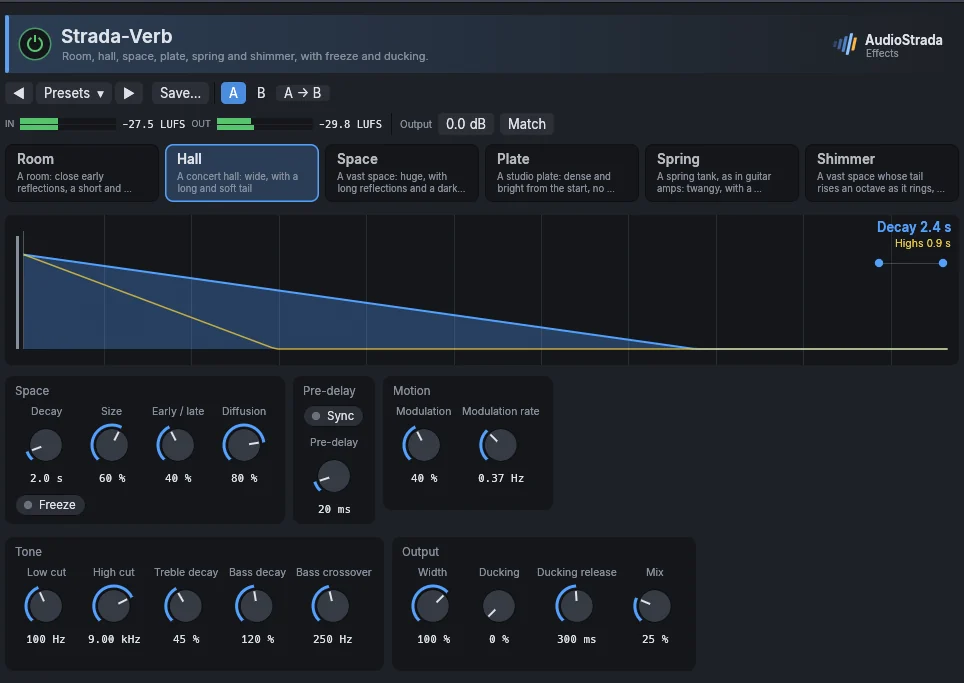
Pick a space: Room, Hall, Space, Plate, Spring or Shimmer (hover a button for what it sounds like). Shimmer is a vast space whose tail rises an octave as it rings; its Shimmer knob sets how much.
Then a color, the character of an era: Clean leaves the tail full and smooth; 80s, the digital reverbs of the 1980s, narrows it to 11 kHz with the grain of 12 bits and a lush chorus; Vintage, the first digital reverbs and the plates of the 1970s, makes it darker (7 kHz), grainier and thinner, with a soft hiss that follows the tail.
The display shows how long each frequency rings, in seconds, over the spectrum of the tail (in the color's tint) and of the input (a line); the cuts shade its ends, and dashed lines mark a beat and a bar at the project's tempo. Drag its points: the green one for the decay, the orange one for how long the lows ring and up to where, the blue one for the highs, the red and violet ones for the low and high cuts. Double-click a point to reset it. Fit to the tempo sets the decay to whole quarters of a bar and the pre-delay to a note value.
The main controls are the large ones: Decay, with Freeze (the tail held forever, for pads), Pre-delay, in milliseconds or, with Sync, as a note value, and Mix. Beside them come the reflections (Size, Early / late, Diffusion), the motion (the modulation's depth and rate), the ducking (how much the tail is lowered while the input plays, and how fast it comes back), the tone (the knobs of the display's points), the width and the Shimmer amount. Those a space does not use are greyed.
Parameters
| Parameter | Range | Default |
|---|---|---|
| Space | Room, Hall, Space, Plate, Spring, Shimmer | Hall |
| Decay | 0.2 – 20 s | 2 s |
| Pre-delay | 0 – 200 ms | 20 ms |
| Low cut | 20 – 1000 Hz | 100 Hz |
| High cut | 1000 – 20000 Hz | 9000 Hz |
| Width | 0 – 150 % | 100 % |
| Mix | 0 – 100 % | 25 % |
| Ducking | 0 – 100 % | 0 % |
| Size | 0 – 100 % | 60 % |
| Early / late | 0 – 100 % | 40 % |
| Treble decay | 10 – 100 % | 45 % |
| Bass decay | 50 – 200 % | 120 % |
| Diffusion | 0 – 100 % | 80 % |
| Modulation | 0 – 100 % | 40 % |
| Freeze | on / off | off |
| Shimmer | 0 – 100 % | 50 % |
| Pre-delay sync | on / off | off |
| Pre-delay note | 1/32, 1/16 T, 1/16, 1/16 D, 1/8 T, 1/8, 1/8 D, 1/4 T, 1/4, 1/4 D, 1/2, 1 bar, 1/2 T, 1/2 D, 2 bars | 1/16 |
| Modulation rate | 0.1 – 5 Hz | 0.37 Hz |
| Bass crossover | 80 – 1000 Hz | 250 Hz |
| Ducking release | 50 – 2000 ms | 300 ms |
| Color | Clean, 80s, Vintage | Clean |
Factory presets
Vocal Plate · Plate, 1/16 pre-delay · Ducked hall · Ballad hall · Close ambience · Eighties plate
Drums Small room · Live room · Tight ambience · Snare, bright plate · Seventies room
Keys Dark plate · Piano hall · Electric piano, soft room · Eighties hall
Guitar Amp spring · Surf spring · Acoustic, wood room · Seventies plate
Pads Vast space · Strings, concert hall · Shimmer · Endless shimmer · Eighties space
Send Vocal plate · Drum room · Medium hall · Large dark hall · Plate, 1/8 pre-delay
Strada-Delay
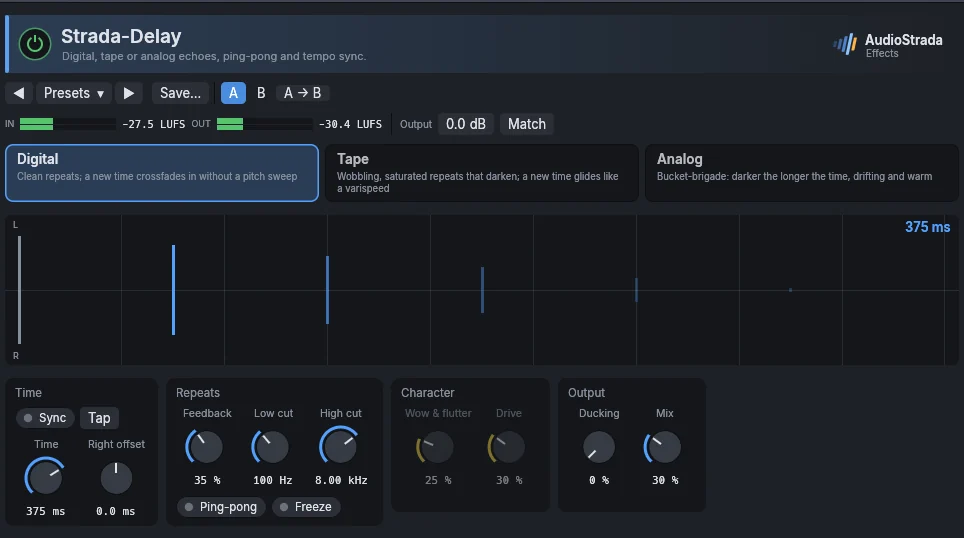
Pick a machine: Digital gives clean repeats, and a new time crossfades in; Tape wobbling, saturated repeats that darken, and a new time glides like a varispeed; Analog (bucket brigade) warm repeats, darker the longer the time.
On the left, the echoes on the tempo grid, left above and right below, light up as they are heard; ping-pong draws their path. Drag the first echo across for the time and up or down for the feedback, and the first one on the right across for its offset. On the right, the tone of the repeats over their spectrum: the yellow curve is one pass through the loop, the fainter ones the passes after it, darker each time; drag the red and violet points for the low and high cuts.
The main controls are the large ones: Time, in milliseconds with Tap, or with Sync as a note value at the project's tempo; Feedback, with Ping-pong and Freeze (what is in the delay repeats forever, the input left out); and Mix. Beside them come the cuts, wow and flutter and drive (tape and analog only), the right side's offset, and ducking (the echoes lowered while the input plays, back in the gaps).
Parameters
| Parameter | Range | Default |
|---|---|---|
| Time | 1 – 4000 ms | 375 ms |
| Feedback | 0 – 95 % | 35 % |
| Ping-pong | on / off | off |
| Low cut | 20 – 2000 Hz | 100 Hz |
| High cut | 1000 – 20000 Hz | 8000 Hz |
| Mix | 0 – 100 % | 30 % |
| Sync to tempo | on / off | off |
| Note | 1/32, 1/16 T, 1/16, 1/16 D, 1/8 T, 1/8, 1/8 D, 1/4 T, 1/4, 1/4 D, 1/2, 1 bar, 1/2 T, 1/2 D, 2 bars | 1/8 D |
| Model | Digital, Tape, Analog | Digital |
| Wow & flutter | 0 – 100 % | 25 % |
| Drive | 0 – 100 % | 30 % |
| Right offset | -50 – 50 ms | 0 ms |
| Ducking | 0 – 100 % | 0 % |
| Freeze | on / off | off |
Factory presets
Vocal Slapback 90 ms · Analog slap 110 ms · Dark 1/8 echo · 1/4 throw, ducked
Guitar Slapback 120 ms · Dotted eighth · Tape echo 330 ms · Wide solo, 1/4 and offset
Synth 1/4 ping-pong · 1/8 triplet ping-pong · Lead, analog 1/8
FX Drums, 1/16 ping-pong · Dub, runaway tape · Stereo widener 25 ms · Worn tape slap
Send 1/4 echo · Dotted 1/8 · Slapback · Tape echo
Modulation
Strada-Chorus
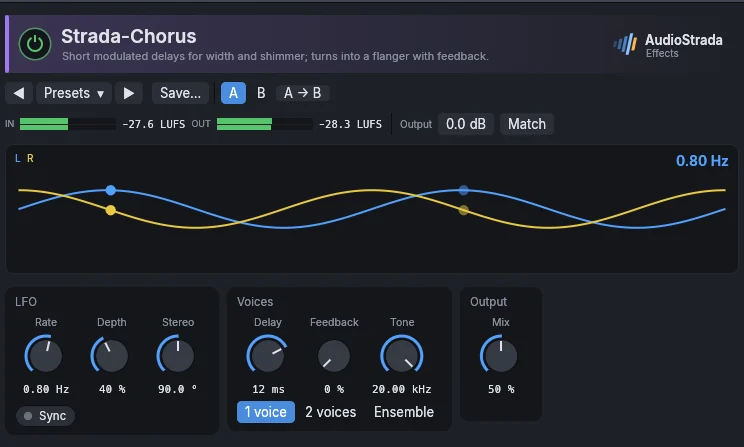
Short modulated delays for width and shimmer, with one voice, two, or an ensemble; with feedback it turns into a flanger.
Parameters
| Parameter | Range | Default |
|---|---|---|
| Rate | 0.05 – 8 Hz | 0.8 Hz |
| Depth | 0 – 100 % | 40 % |
| Delay | 1 – 30 ms | 12 ms |
| Feedback | 0 – 90 % | 0 % |
| Mix | 0 – 100 % | 50 % |
| Sync to tempo | on / off | off |
| Note | 1/32, 1/16 T, 1/16, 1/16 D, 1/8 T, 1/8, 1/8 D, 1/4 T, 1/4, 1/4 D, 1/2, 1 bar, 1/2 T, 1/2 D, 2 bars | 1 bar |
| Voices | 1 voice, 2 voices, Ensemble | 1 voice |
| Stereo | 0 – 180 ° | 90 ° |
| Tone | 1000 – 20000 Hz | 20000 Hz |
Factory presets
Vocal Subtle thickening · Backing, wide · Dreamy double
Guitar Clean 80s · Acoustic, 12-string · Slow shimmer · Bass, fretless shimmer
Keys Electric piano · Organ, slow rotor · Piano, honky-tonk
Synth Lush ensemble · 80s poly chorus · String ensemble · Wide pad
FX Vibrato · Resonant sweep · Synced 1 bar swirl
Strada-Flanger
The classic jet flanger, with positive or negative feedback, stereo sweep and Through zero, the tape flanging of the sixties.
Parameters
| Parameter | Range | Default |
|---|---|---|
| Rate | 0.02 – 5 Hz | 0.25 Hz |
| Depth | 0 – 100 % | 70 % |
| Manual | 0.1 – 8 ms | 1 ms |
| Feedback | -95 – 95 % | 60 % |
| Stereo | 0 – 180 ° | 90 ° |
| Mix | 0 – 100 % | 50 % |
| Output | -12 – 6 dB | 0 dB |
| Sync to tempo | on / off | off |
| Note | 1/32, 1/16 T, 1/16, 1/16 D, 1/8 T, 1/8, 1/8 D, 1/4 T, 1/4, 1/4 D, 1/2, 1 bar, 1/2 T, 1/2 D, 2 bars | 1/2 T |
| Through zero | on / off | off |
Factory presets
Guitar Subtle motion · Jet · Bass, slow flange
Vocal Psychedelic sweep · Soft doubling · Robot tube
Synth Metallic · 1 bar sweep · Pad, wide motion · Hollow drain
Drums Hi-hats, swirl · Bus, through-zero · Snare, tape flange
Strada-Phaser
A swirling phaser of 4 to 12 stages, with feedback and stereo spread.
Parameters
| Parameter | Range | Default |
|---|---|---|
| Rate | 0.02 – 8 Hz | 0.4 Hz |
| Depth | 0 – 100 % | 80 % |
| Low | 50 – 2000 Hz | 250 Hz |
| High | 500 – 12000 Hz | 3500 Hz |
| Feedback | -90 – 90 % | 40 % |
| Stages | 4 stages, 6 stages, 8 stages, 12 stages | 6 stages |
| Stereo | 0 – 180 ° | 90 ° |
| Mix | 0 – 100 % | 50 % |
| Sync to tempo | on / off | off |
| Note | 1/32, 1/16 T, 1/16, 1/16 D, 1/8 T, 1/8, 1/8 D, 1/4 T, 1/4, 1/4 D, 1/2, 1 bar, 1/2 T, 1/2 D, 2 bars | 1/2 T |
Factory presets
Guitar Classic 4-stage · Funk rhythm · Fast vibe
Keys Electric piano swirl · Clav funk · Organ, slow rotor
Synth Deep swirl · 1/2 synced sweep · Pad, slow 12-stage · Resonant 1 bar
FX Vocal, subtle movement · Drums, breakbeat sweep · Hi-hats, jet stream · Whole mix, slow notch
Strada-Mod
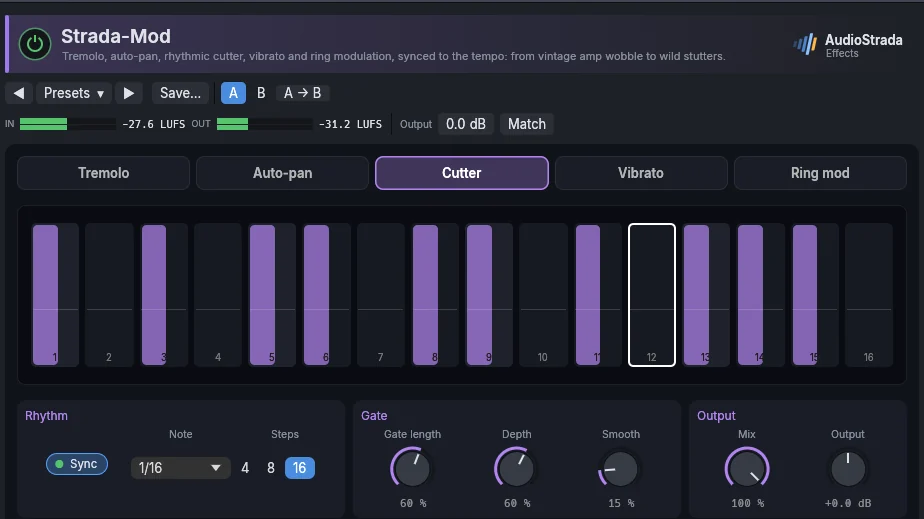
Tremolo, auto-pan, rhythmic cutter (a step sequencer of the level), vibrato and ring modulation, synced to the tempo.
Parameters
| Parameter | Range | Default |
|---|---|---|
| Mode | Tremolo, Auto-pan, Cutter, Vibrato, Ring mod | Tremolo |
| Sync to tempo | on / off | on |
| Note | 1/32, 1/16T, 1/16, 1/16D, 1/8T, 1/8, 1/8D, 1/4T, 1/4, 1/4D, 1/2, 1 bar, 2 bars, 4 bars | 1/8 |
| Rate | 0.05 – 40 Hz | 4 Hz |
| Depth | 0 – 100 % | 60 % |
| Shape | Sine, Triangle, Saw up, Saw down, Square, Random | Sine |
| Stereo phase | 0 – 180 ° | 0 ° |
| Smooth | 0 – 100 % | 15 % |
| Steps | 4, 8, 16 | 16 |
| Gate length | 5 – 100 % | 60 % |
| Frequency | 20 – 4000 Hz | 220 Hz |
| Mix | 0 – 100 % | 100 % |
| Output | -12 – 12 dB | 0 dB |
| Step n | on / off | on |
Factory presets
Tremolo Vintage amp · Surf · Choppy 1/16 · Stereo shimmer · Slow swell
Pump Sidechain 1/4 · Soft 1/8
Auto-pan Gentle 1/2 · Wide circle 1/8 · Ping-pong 1/4 · Random drift
Cutter Trance gate · Offbeat stabs · Stutter 1/32 · Dotted groove · Half-time duck · Glitch
Vibrato Subtle · Warped tape · Chorus-like · Seasick
Ring Robot voice · Metallic bell · Dalek · Alien radio
Strada-Pitch
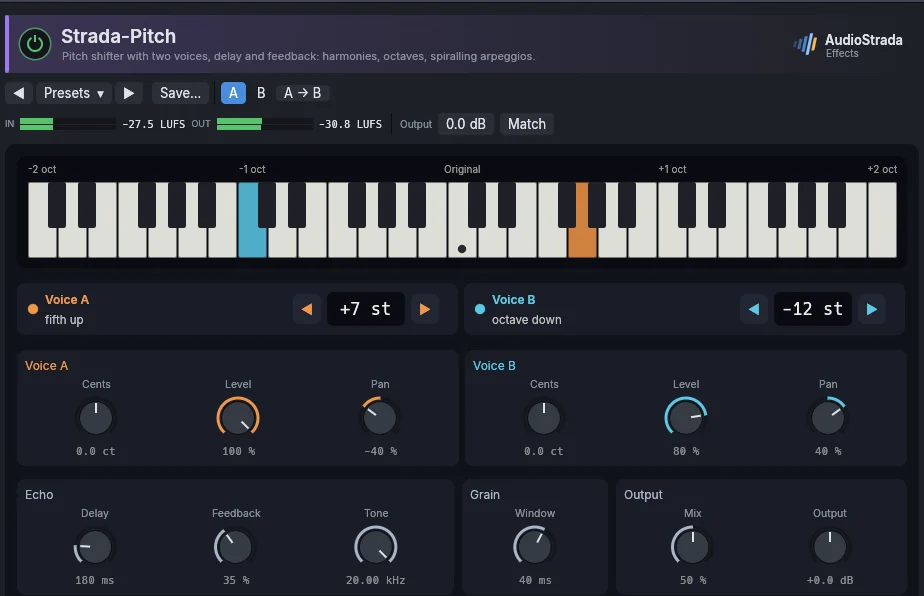
A pitch shifter with two voices, delay and feedback: harmonies, octaves, widening, and shimmering echoes.
Parameters
| Parameter | Range | Default |
|---|---|---|
| Voice A semitones | -24 – 24 st | 12 st |
| Voice A cents | -50 – 50 ct | 0 ct |
| Voice A level | 0 – 100 % | 100 % |
| Voice A pan | -100 – 100 % | 0 % |
| Voice B semitones | -24 – 24 st | -12 st |
| Voice B cents | -50 – 50 ct | 0 ct |
| Voice B level | 0 – 100 % | 0 % |
| Voice B pan | -100 – 100 % | 0 % |
| Window | 10 – 100 ms | 40 ms |
| Delay | 0 – 1000 ms | 0 ms |
| Feedback | 0 – 95 % | 0 % |
| Tone | 1000 – 20000 Hz | 20000 Hz |
| Mix | 0 – 100 % | 100 % |
| Output | -12 – 12 dB | 0 dB |
Factory presets
Octave Up · Down · Up and down · Vocal, octave below, blended · Bass, sub octave
Harmony Fifth above · Major third above · Fourth below · Third and fifth
FX Chipmunk · Monster voice · Demon and child · Micro-shift widener
Spiral Rising shimmer · Falling · Fifths staircase · Glitch cascade
Colour
Strada-Drive
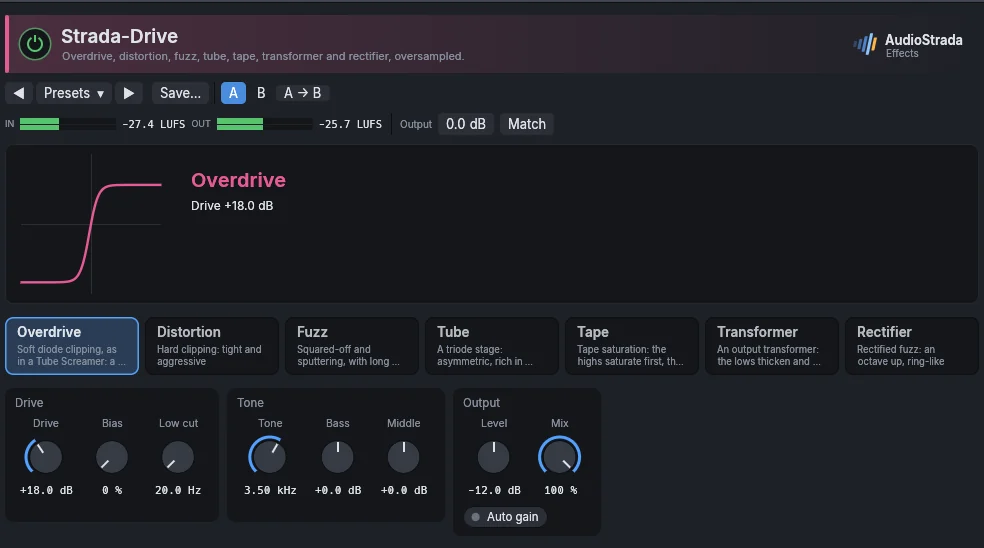
Pick a type (Overdrive, Distortion, Fuzz, Tube, Tape, Transformer, Rectifier). Drive goes from clean to exaggerated by even steps: the first third adds a little color to a bass or a bus, the top a fuzz. Peaks keep their level whatever the drive; Auto gain matches the loudness instead, so that you judge the color and not the volume. Output trims the level, Mix blends the dry sound back in.
The display shows the spectrum of the input (a line) and of the output, where the added harmonics glow. The orange line is how hard each frequency is driven: drag its points for the drive, the Low cut that keeps the lows out of the saturation, and the Focus, a band driven harder (to bring a bass forward) or softer than the rest, its tone unchanged. The white line is the tone after the drive: drag its points for the Bass, the Middle (and its frequency) and the Tone, a high cut. Double-click a point to reset it. Bias makes the clipping asymmetric (warmer, even harmonics).
Parameters
| Parameter | Range | Default |
|---|---|---|
| Type | Overdrive, Distortion, Fuzz, Tube, Tape, Transformer, Rectifier | Overdrive |
| Drive | 0 – 100 % | 35 % |
| Tone | 500 – 20000 Hz | 20000 Hz |
| Level | -24 – 24 dB | 0 dB |
| Mix | 0 – 100 % | 100 % |
| Low cut | 20 – 600 Hz | 20 Hz |
| Bias | 0 – 100 % | 0 % |
| Bass | -12 – 12 dB | 0 dB |
| Middle | -12 – 12 dB | 0 dB |
| Auto gain | on / off | off |
| Focus | -12 – 12 dB | 0 dB |
| Focus frequency | 40 – 10000 Hz | 1000 Hz |
| Middle frequency | 200 – 5000 Hz | 800 Hz |
Factory presets
Bass Thick transformer · Parallel grit · Growl
Vocal Parallel grit · Tube sheen · Megaphone
Drums Parallel crunch · Warm tape · Snare bite
Guitar Light crunch · Lead · Tight metal · Fuzz · Octave fuzz
Keys Warm tube · Electric piano bark · Organ grind
Bus Mix, tape warmth · Mix, transformer weight · Drums, tube glow
Lo-fi Blown speaker · Transistor radio · Dying battery
Strada-Tape
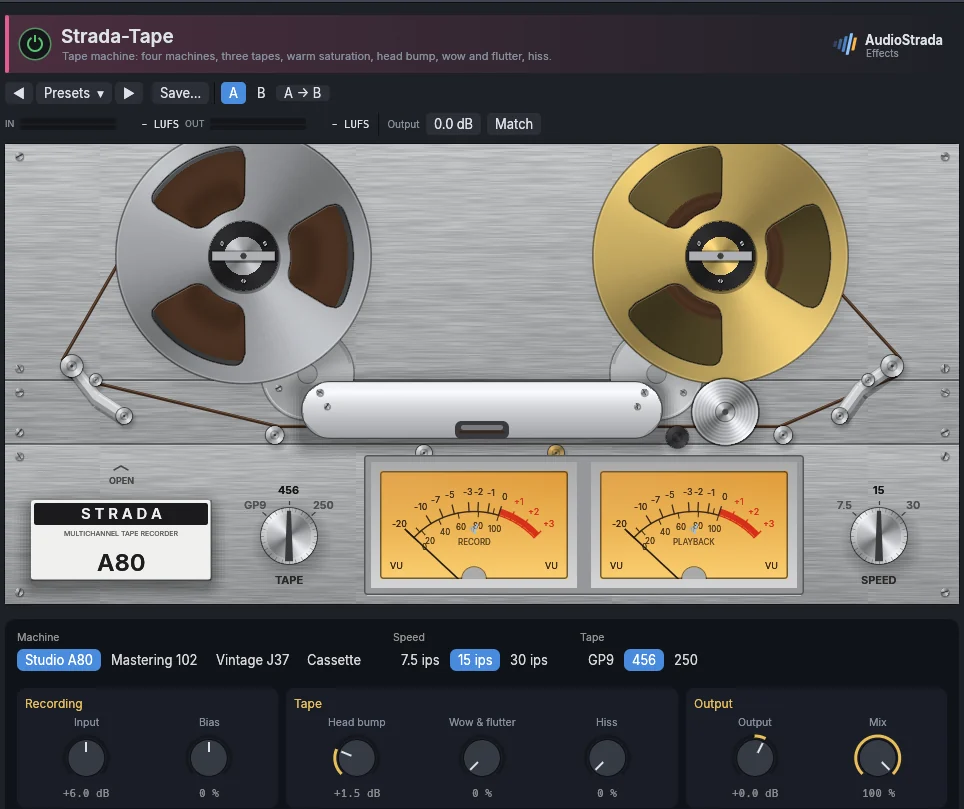
A tape machine, drawn with its reels turning at the chosen speed and its VU meters. Four machines: Studio A80 (2-inch studio deck: punchy lows, firm mids), Mastering 102 (half-inch mastering deck: wide, clean and smooth), Vintage J37 (four-track: darker, rounder, saturates early), Cassette (soft top, warble and hiss). Three tapes: GP9 (modern, most headroom), 456 (the classic, compresses when pushed), 250 (vintage, saturates early). Speed, head bump, wow and flutter, hiss and bias complete it.
Parameters
| Parameter | Range | Default |
|---|---|---|
| Input | -12 – 24 dB | 0 dB |
| Speed | 7.5 ips, 15 ips, 30 ips | 15 ips |
| Head bump | 0 – 6 dB | 1.5 dB |
| Wow & flutter | 0 – 100 % | 0 % |
| Hiss | 0 – 100 % | 0 % |
| Bias | -100 – 100 % | 0 % |
| Output | -18 – 12 dB | 0 dB |
| Mix | 0 – 100 % | 100 % |
| Machine | Studio A80, Mastering 102, Vintage J37, Cassette | Studio A80 |
| Tape | GP9, 456, 250 | 456 |
Factory presets
Mix bus Glue 30 ips · Warm 15 ips · Vintage
Mastering Transparent 30 ips · Analog sheen · Round 15 ips
Drums Punchy 15 ips · Crushed room · Parallel smash
Bass Round 15 ips · Thick 7.5 ips · Tight 30 ips
Vocal Smooth 30 ips · Vintage warmth · Pushed hard
Instrument Guitars, glue 15 ips · Keys, warm wobble · Acoustic guitar, soft top
Lo-fi Cassette demo · Worn cassette · Warbly tape
Stereo
Strada-Wide
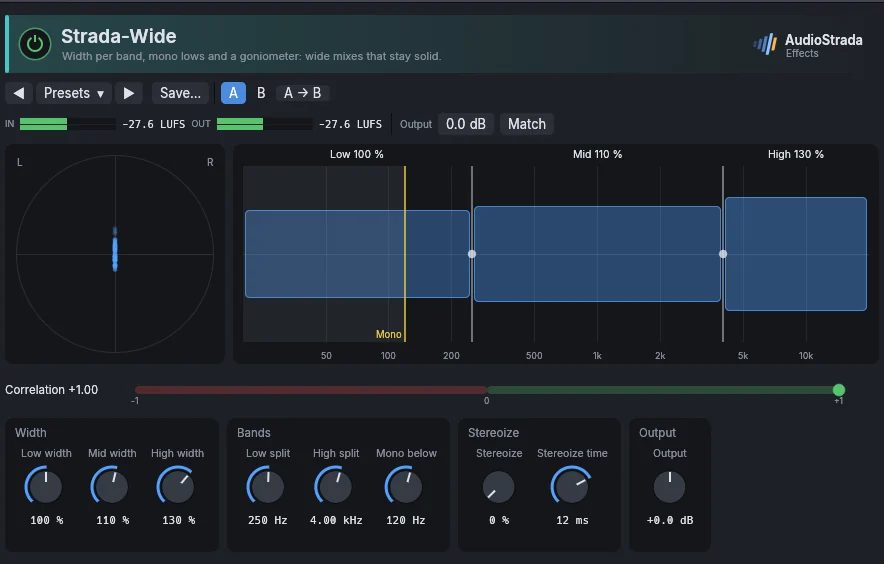
Width per band, mono lows and a goniometer: wide mixes that stay solid in mono. Stereoize makes a stereo image from a mono source.
Parameters
| Parameter | Range | Default |
|---|---|---|
| Low width | 0 – 200 % | 100 % |
| Mid width | 0 – 200 % | 110 % |
| High width | 0 – 200 % | 130 % |
| Low split | 60 – 1000 Hz | 250 Hz |
| High split | 1000 – 12000 Hz | 4000 Hz |
| Mono below | 20 – 500 Hz | 120 Hz |
| Output | -12 – 12 dB | 0 dB |
| Stereoize | 0 – 100 % | 0 % |
| Stereoize time | 1 – 30 ms | 12 ms |
Factory presets
Master Mono bass 150 Hz · Wide top · Gentle widen · Focus the center
Bus Drums, wide overheads · Guitars, wide doubles · Pads, super wide · Backing vocals, spread
Fix Mono source, stereoize · Bass, mono lows · Tame a too-wide source · Check in mono
Strada-Doubler
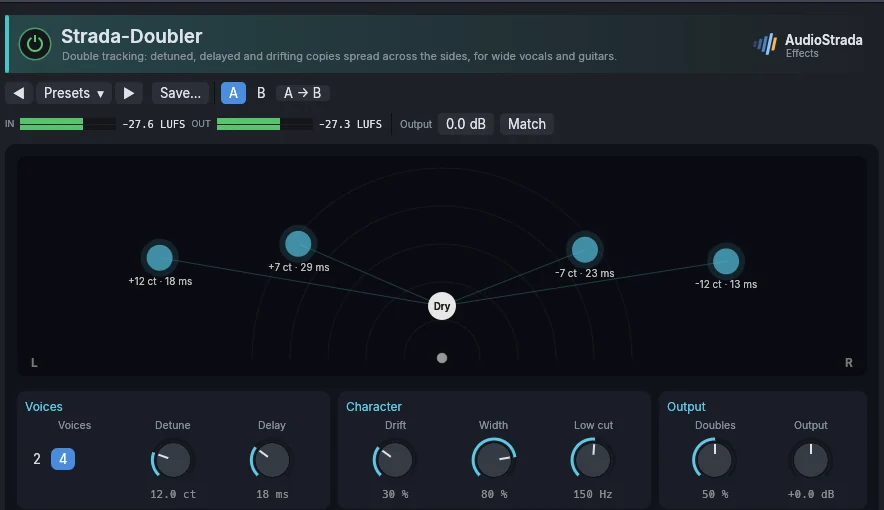
Double tracking: detuned, delayed and drifting copies spread across the stereo field, for vocals and guitars recorded once.
Parameters
| Parameter | Range | Default |
|---|---|---|
| Voices | 2, 4 | 2 |
| Detune | 0 – 50 ct | 8 ct |
| Delay | 0 – 60 ms | 10 ms |
| Width | 0 – 100 % | 80 % |
| Drift | 0 – 100 % | 30 % |
| Low cut | 20 – 1000 Hz | 150 Hz |
| Doubles | 0 – 100 % | 50 % |
| Output | -12 – 12 dB | 0 dB |
Factory presets
Vocal Natural double · Tight widen · Stack of takes · Vintage ADT · Slapback double
Guitar Wall · Subtle stereo · Acoustic, twin takes
Synth Wide pad · Lead, fat unison · Bass, wide tops
FX Out-of-tune choir · Drunken double · Crowd of four
Utility
Strada-Utility
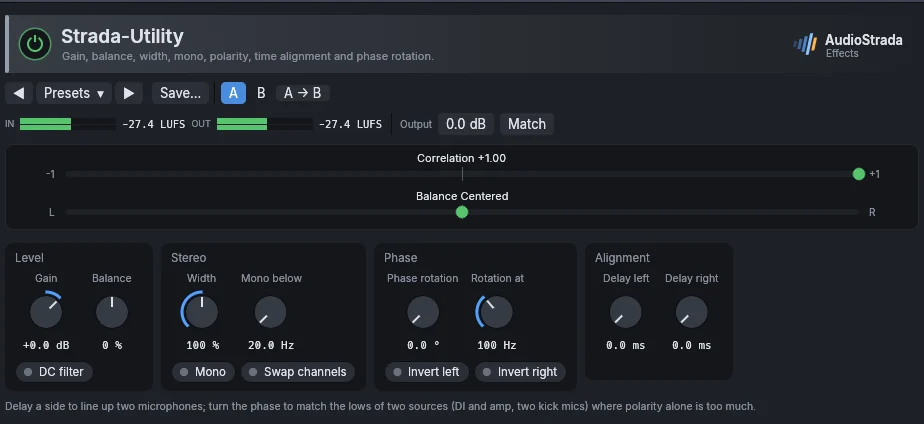
Gain, balance, width, mono and mono below a frequency, polarity per channel, channel swap, time alignment in milliseconds and phase rotation.
Parameters
| Parameter | Range | Default |
|---|---|---|
| Gain | -48 – 24 dB | 0 dB |
| Width | 0 – 200 % | 100 % |
| Mono | on / off | off |
| Invert left | on / off | off |
| Invert right | on / off | off |
| Swap channels | on / off | off |
| Balance | -100 – 100 % | 0 % |
| Delay left | 0 – 20 ms | 0 ms |
| Delay right | 0 – 20 ms | 0 ms |
| Phase rotation | 0 – 180 ° | 0 ° |
| Rotation at | 20 – 2000 Hz | 100 Hz |
| DC filter | on / off | off |
| Mono below | 20 – 500 Hz | 20 Hz |
Factory presets
Fix Flip polarity · Flip left polarity · Flip right polarity · Swap channels · Remove DC offset · Mono bass below 120 Hz
Gain -6 dB headroom · -12 dB before a hot plugin · +6 dB
Width Mono check · Narrow 50% · Wide 130% · Haas widener 12 ms
Strada-Correct
Automatic pitch correction for the voice, from a light touch to the stepped, synthetic voice. The display scrolls the pitch sung (grey) and the corrected one (blue) over the notes of the scale; at its right, the note sung and how far off it is, the note aimed at, and a bar showing by how many cents the voice is being moved.
- Natural follows the settings: Retune speed is the time the voice takes to reach its note (0 ms is immediate, 20 to 60 ms sounds like a singer in tune), Humanize corrects the center of a held note and leaves its vibrato, Tolerance leaves alone a note already that close, Amount corrects only a part of the way.
- Staircase puts every note flat on its target at once, whatever those settings: the voice moves in steps, vibrato and slides gone, as on the first automatically corrected records. Choose a scale with few notes for wider steps.
- Harmony corrects the voice as Natural does and adds a second voice singing along in the key: a third, fifth, sixth or octave above, a third, fourth or octave below, counted in the notes of the scale (of the major scale of the key when the scale is chromatic). Level sets the second voice against the first; the pair keeps the loudness of one voice.
Choose the key and the scale (or click notes on the keyboard for a Custom one). While the voice plays, the effect listens for the key of what is sung and shows it under the keyboard (Heard: A minor); Use this key sets the key and the scale to it. Transpose moves the whole voice by semitones, formants kept.
Parameters
| Parameter | Range | Default |
|---|---|---|
| Key | C, C#, D, D#, E, F, F#, G, G#, A, A#, B | C |
| Scale | Chromatic, Major, Minor, Harmonic minor, Dorian, Pentatonic major, Pentatonic minor, Blues, Custom | Chromatic |
| Retune speed | 0 – 400 ms | 25 ms |
| Humanize | 0 – 100 % | 0 % |
| Amount | 0 – 100 % | 100 % |
| Transpose | -12 – 12 st | 0 st |
| Custom notes | 0 – 4095 | 4095 |
| Tolerance | 0 – 50 cents | 0 cents |
| Mode | Natural, Staircase, Harmony | Natural |
| Harmony | Third above, Fifth above, Sixth above, Octave above, Third below, Fourth below, Octave below | Third above |
| Harmony level | 0 – 100 % | 60 % |
Factory presets
Vocal Hard tune · Pop, tight · Natural, keeps the vibrato · Ballad, long notes only · Light touch · Backing, locked
Staircase Every semitone · Major scale · Minor pentatonic · Low and synthetic
Harmony Third above · Fifth above, discreet · Octave below, doubled
FX Octave down · Octave up · A fifth above, tight
Strada-Scope
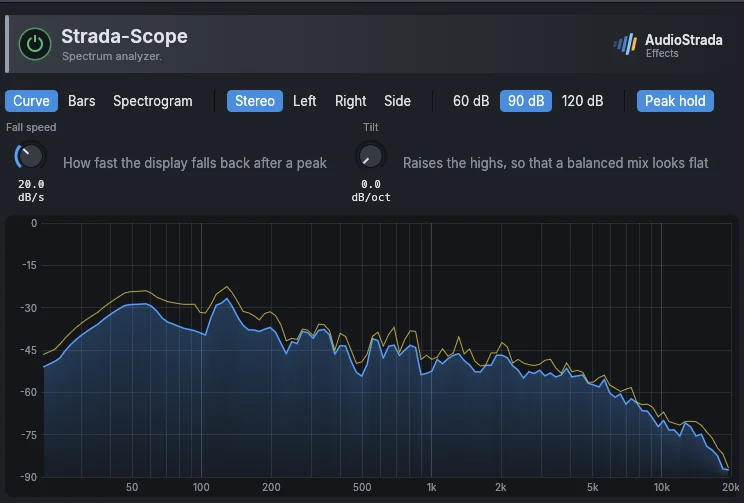
A spectrum analyzer, with peak hold, tilt and the choice of what it shows.
Parameters
| Parameter | Range | Default |
|---|---|---|
| Fall speed | 1 – 60 dB/s | 20 dB/s |
| View | Curve, Bars, Spectrogram | Curve |
| Source | Stereo, Left, Right, Side | Stereo |
| Range | 60 dB, 90 dB, 120 dB | 90 dB |
| Tilt | 0 – 6 dB/oct | 0 dB/oct |
| Peak hold | on / off | on |
Strada-Tuner
A chromatic tuner for guitar, bass and voice; it can mute the track while tuning.
Parameters
| Parameter | Range | Default |
|---|---|---|
| Reference A4 | 415 – 466 Hz | 440 Hz |
| Mute while tuning | on / off | off |
| View | Needle, Strobe | Needle |
Amp and cab
Strada-Amp
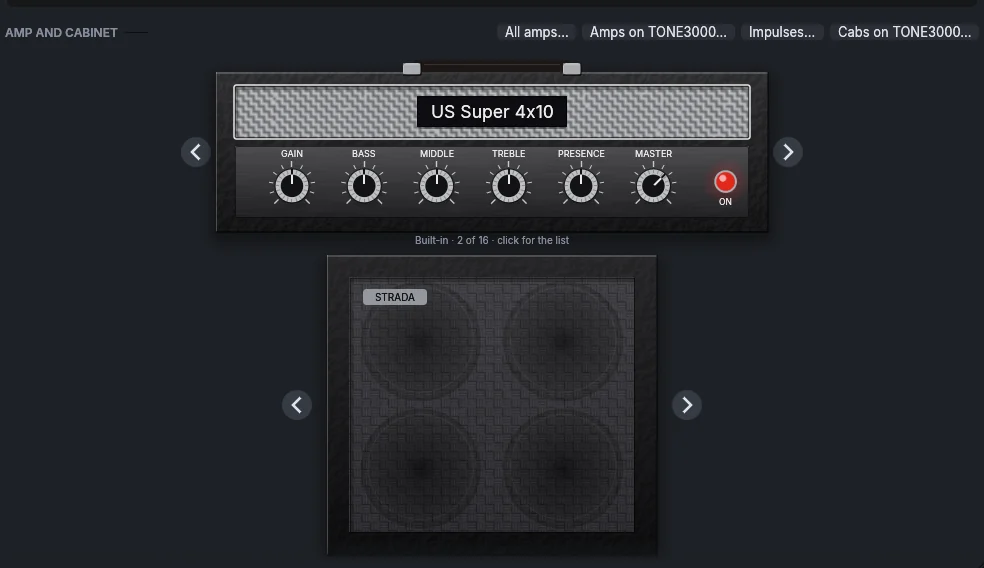
A whole guitar or bass rig: up to eight pedals, an amp and a cabinet. The window has three sections: Pedalboard, Amp and Cab.
- Pedals: click + to add one; over a pedal, the pencil changes it and the cross removes it; drag a pedal to move it. Click its footswitch to turn it on or off. 21 pedals after the classics: Tube Screamer, Klon, Blues Driver, SD-1, DS-1, RAT, Metal Zone, Fuzz Face, Big Muff, Rangemaster, Cry Baby wah, compressor, modulation, analog and tape delay, reverb.
- Amps: the arrows beside the amp step through them; click its name for the full list. 16 built-in models after the most played amps (Twin, Super and Deluxe Reverb, Tweed Deluxe, Bassman, AC30, JTM45, Plexi, JCM800, Friedman, Dumble, Dual Rectifier, 5150, Diezel, SVT, B-15), each with its own preamp, tone stack and power stage, and a matching cabinet.
- My library lists your Neural Amp Modeler captures by category (Amps, Amps + cab, Pedals, Other, Favorites). Add captures… copies
.namfiles into AudioStrada's library, sorted by gear; right-click a card to rename it, change its category, star it or remove it. A folder of captures of one amp is one amp: its Gain knob steps between them. A capture freezes the amp at one setting: Bass, Middle, Treble, Presence and Master shape the sound after it. - TONE3000: Browse TONE3000… opens its free captures by kind (amps, effects, cabs): trending, latest, your favorites and downloads. A click downloads a tone and loads it where it belongs. Signing in (free account) shows your favorites.
Parameters
| Parameter | Range | Default |
|---|---|---|
| Input | -24 – 24 dB | 0 dB |
| Gate (-100 = off) | -100 – -20 dB | -100 dB |
| Gain | 0 – 10 | 5 |
| Bass | 0 – 10 | 5 |
| Middle | 0 – 10 | 5 |
| Treble | 0 – 10 | 5 |
| Presence | 0 – 10 | 5 |
| Master | -24 – 12 dB | 0 dB |
| Cabinet | 4x12 V30, 4x12 Greenback, 2x12 Blue (open), 2x12 US (open), 4x10 US (open), 1x12 US (open), 4x10 bass, 8x10 bass, 1x15 bass, Direct, Impulse response | 4x12 V30 |
| Normalize loudness | on / off | on |
| Amp model | Capture, US Twin, US Super 4x10, US Deluxe, Tweed Deluxe 57, Tweed Bass 59, Voxy 15 Top Boost, Brit 45 Bluesbreaker, Brit Plexi 100, Boutique 59, Cali Mark IV, Panama 52, Bass Classic, Bass Flip 15 | US Super 4x10 |
Factory presets
Clean Sparkle · Edge of breakup · Jangle · Warm jazz
Crunch Blues · Rock · Tweed bite · Boutique edge
Lead Singing · Liquid · Fuzz rock
High gain Metal · Modern rhythm · Thrash scoop
Bass Classic · Flip-top, round · Driven rock